Already have a course outline in a document, a syllabus or on another website? Paste it in, upload it as a text file, or point us at a public web page, and we turn it into modules and lessons. You review the result before anything is created, and every lesson arrives as an empty draft ready for your content.
Who can do this
- Owners, admins and staff. Viewers are refused with "You don’t have permission for this."
- The new course counts toward your plan's product limit. See Plans and billing.
Paste or upload your outline
- In Catalog, click New product, keep Course and click Get started.
- Under How do you want to start?, choose Import existing course.
- Fill in Title and, if you like, Brief description.
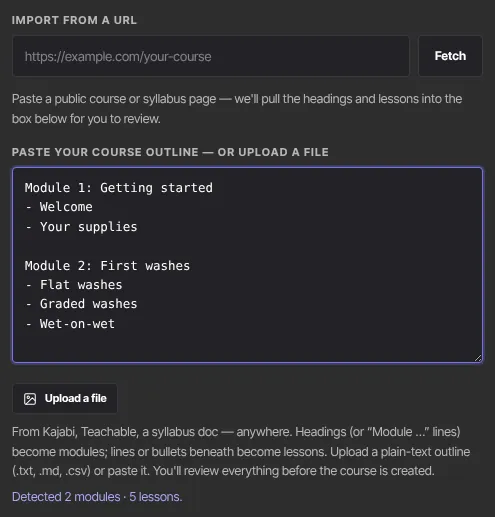
- Paste your outline into Paste your course outline — or upload a file. Or click Upload a file and choose a plain-text file (.txt, .md or .csv, up to 1 MB); its text fills the box so you can edit it.
- As you type, a line under the box shows what we found, for example Detected 2 modules · 5 lessons.
- Choose Evergreen or Cohorts on the right, then click Review outline.
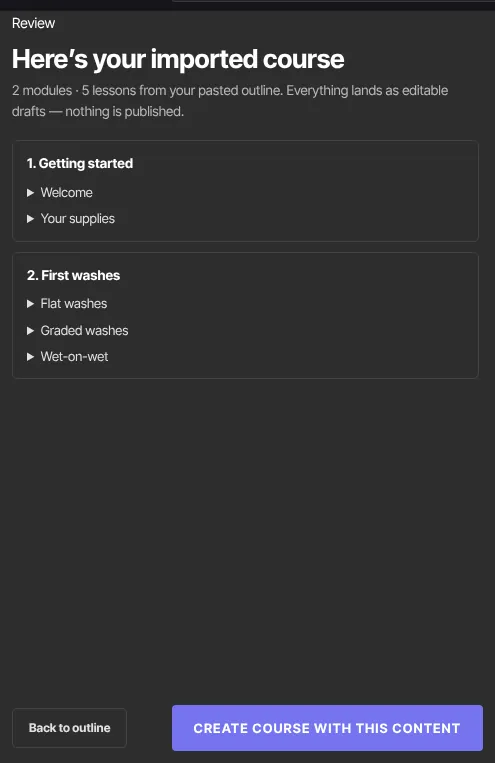
- The review step, Here’s your imported course, shows the modules and lessons, and you can edit, reorder, add or remove any of them right there. Click Back to outline to start over from the pasted text, or Create course with this content to create the course.
Import from a web page
- On the same step, paste the address of a public course or syllabus page into Import from a URL and click Fetch. The button reads Fetching… while it works.
- The headings and lessons we find fill the outline box. Edit them if needed, then carry on from step 5 above.
The page must be public, and its address must start with https. We only read the page's text; nothing is saved until you create the course.
How your outline is read
- A line starting with Module, Section, Unit, Week, Part or Chapter (for example
Module 1: Getting started), or a markdown heading (#,##or###), starts a new module. - Lines starting with
-,*,•,1.or1)become lessons in that module. - A plain line after a blank line starts a module, and plain lines right under it become its lessons.
- A flat list with no headings becomes one module called Course content.
- Up to 12 modules, with up to 15 lessons each, are kept. If you go over, the detected line adds how many will be skipped.
Bring a whole course from another platform
The same step has a Bring your whole course over panel. It connects to another course platform and brings whole courses over in the background; what comes across depends on the platform. See Bring a whole course over in the product wizard.
What happens next
- The course opens in the builder as a draft. Lessons have titles only; add text, video and files in each lesson. See Write and set up a lesson.
- Members see nothing until the course is published and its lessons are Live.
Common errors
- "Add a title to continue.": fill in Title.
- "Paste your outline first — one module per heading, lessons as lines or bullets beneath it.": the box is empty, or we couldn't find any lessons. Put lessons under each module.
- "That file is over 1 MB — paste the outline text instead.": paste the text instead of uploading.
- "Could not read that file — try a .txt or .md, or paste the text.": use a plain-text file, or paste.
- "Paste a course or syllabus URL first.": the URL box is empty.
- "That URL must be a public https web page.": use a public address that starts with https.
- "That page returned an error (…)." or "Couldn’t fetch that page — check the URL, or paste the outline instead.": check the address works in your browser.
- "That link isn’t a web page — paste the outline text instead.", "That page is too large to import — paste the outline instead." or "Couldn’t find an outline on that page — paste it instead.": copy the outline from the page and paste it.
- "That page took too long to load.": try again, or paste the outline.
- "Too many imports — wait a minute and try again.": wait a minute.
- "You've reached your … plan's limit of … products. Upgrade in Settings → Billing to add more.": you're at your plan's product limit.