Dripping releases lessons gradually instead of all at once. You set it lesson by lesson: a dripped lesson opens a set number of days after a member gets access or, in a cohort course, after the cohort's start date. Members can see what's coming and when it unlocks, which keeps them moving through the course at your pace.
Who can do this
- Owners, admins and staff set a lesson's release in the lesson editor.
- Viewers can't; saving shows "You don’t have permission for this."
- The workspace release time (below) can only be changed by owners and admins.
Drip a lesson
- Open the lesson in the lesson editor.
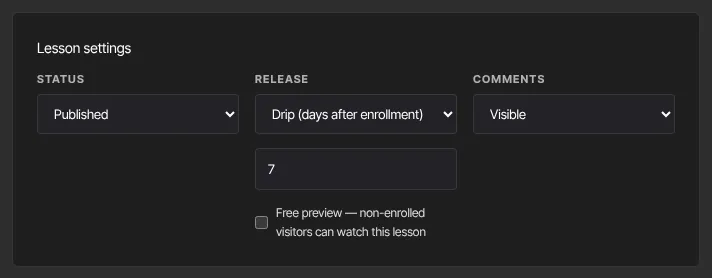
- In Lesson settings, set Release to Drip (days after enrollment).
- In the box that appears (Days after enrollment), enter the number of days. It starts at 7; enter 0 to open the lesson on the first day.
- Click Save lesson. ● Saved appears.
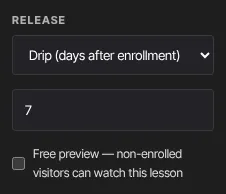
To release a lesson as soon as a member has access, set Release back to Immediate on enrollment and click Save lesson.
Drip is set per lesson. Modules don't have their own release setting; a module opens as its lessons do.
When a dripped lesson opens
- Evergreen courses: the days count from the day each member got access, so everyone gets the same journey whenever they join.
- Cohort courses: once the course has a cohort start date, the days count from that date, for everyone. Until a date is set, they count from each member's own access date. See Cohort courses.
- Release time: on the unlock day, the lesson opens at your workspace's drip release time, in UTC. An owner or admin sets it at Settings → Drip settings; see Set the time dripped lessons unlock.
Only lessons set to Drip wait. Lessons on Immediate on enrollment open as soon as a member has access, even in a cohort course before its start date.
Scheduled (date) and Locked (prerequisite)
- Scheduled (date): a date-and-time field appears. Pick when the lesson opens; it opens then for every member with access. The time is in your workspace time zone (Settings → Account details).
- Locked (prerequisite): a list of the course's other lessons appears, grouped by module, with drafts marked (draft). Pick the lesson members must complete first; the lesson opens for each member once they complete it.
Both need their field filled in before Save lesson works. A release date or prerequisite that came in from an import or the API is kept when you save the lesson for another reason.
What happens next
- A member who opens a dripped or scheduled lesson early sees This lesson is locked with the date it opens. A locked lesson names the lesson to complete first: Complete “…” to unlock this one.
- When a dripped lesson opens for a member, they get a "New lesson unlocked" email at that moment: the same day and release time the lesson opens, counted from the cohort start date in a cohort course.
- The email goes only if the member still has access and the lesson is still published and dripped when it opens. A lesson you publish or set to Drip later is included, and changing a lesson's days moves its email too.
- A lesson that is already open when you publish it, or when a member joins, doesn't send an email: it's simply open.
Common errors
- "Please fix the highlighted fields.": the days must be a whole number from 0 to 3650.
- "Pick the date this lesson opens." or "Enter a valid release date.": Scheduled needs a date and time.
- "Pick the lesson members must complete first.": Locked needs a lesson. "A lesson can’t be its own prerequisite.": pick a different lesson. "Those lessons would wait on each other in a loop…": the lesson you picked already waits on this one; pick another.
- "Could not save the lesson.": save again.
- "You don’t have permission for this.": viewers can't change lessons.
- Dripped lessons opened for everyone on the same day: in a cohort course they count from the cohort start date, so that's expected once the date has passed.