A cohort course moves a group of members through the material together. Instead of each member's dripped lessons counting from the day they joined, every dripped lesson counts from one shared cohort start date, so week 2 opens for everyone at once and discussions line up.
Who can do this
- Owners, admins and staff can create a cohort course.
- Setting or changing the cohort start date needs an owner or admin. Staff and viewers see "You don’t have permission to do that."
Create a cohort course
- In Catalog, click New product, keep Course and click Get started.
- Fill in the Course setup step as usual; see Create a course.
- Under What type of course?, click Cohorts. The panel shows Cohort-based and its features.
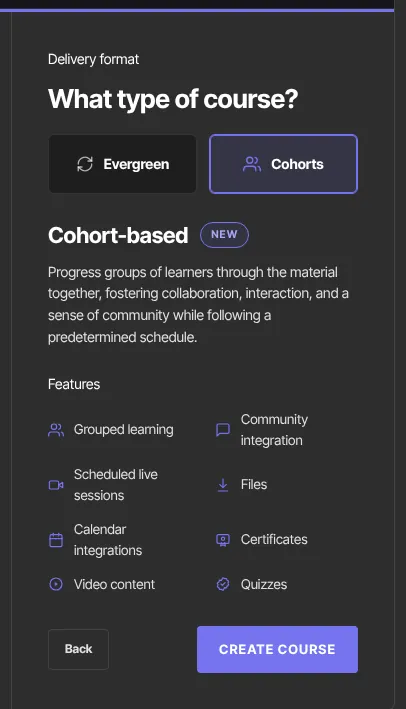
- Click Create course (or Generate course, or Review outline if you're importing).
You can enter the cohort start date in the Start date field when you create the course, or set or change it afterwards, as below.
You can't change a course between Cohorts and Evergreen after creating it. To run the same material both ways, keep two courses. Duplicating copies the content, but the copy keeps the original's format.
Set the cohort start date
- Open the course and click its Settings tab.
- In the Cohort delivery panel, pick the Cohort start date.
- Click Save cohort date.
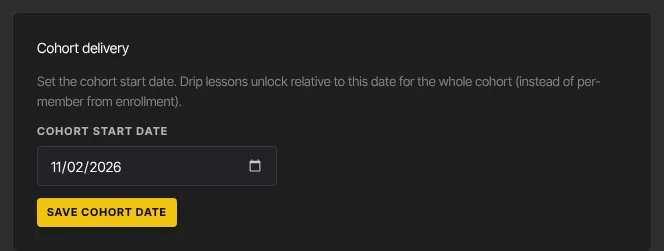
To remove the date, clear the field and click Save cohort date. The Cohort delivery panel only appears on cohort courses.
How lessons unlock in a cohort course
- Lessons set to Drip (days after enrollment) open that many days after the cohort start date, for everyone. A member who joins late finds the earlier lessons already open.
- Lessons set to Immediate on enrollment open as soon as a member has access, even before the start date. To hold the first lesson until the start date, drip it with 0 days.
- Until you set a start date, dripped lessons count from each member's own access date, as in an evergreen course.
- On the unlock day, lessons open at your workspace's drip release time. See Set the time dripped lessons unlock.
What happens next
- Members see locked lessons with the date each one unlocks.
- "New lesson unlocked" emails go when each lesson opens, counted from the cohort start date. To say more to the whole group when a new module opens, post a course announcement.
Common errors
- "You don’t have permission to do that.": only owners and admins can set the cohort start date.
- There's no Cohort delivery panel: the course was created as Evergreen, and formats can't be changed. Create a new course with Cohorts.
- The date you typed when creating the course is missing: that field doesn't save. Set the date on the Settings tab.
- "Your free trial has ended, so your workspace is read-only. …": subscribe in Settings → Billing to make changes again.