Revenue → Transactions is the record of every payment your school takes: who bought what, when, for how much, and where each order stands now. From here you look up an order, resend its receipt and refund it. Chargebacks show up here too, so you can see which orders a buyer's bank is reviewing.
Who can do this
- Everyone on your team (owner, admin, staff and viewer) can open Transactions and read orders.
- Owners and admins can refund. Staff and viewers still see the Refund button, but confirming it shows "You don’t have permission to issue refunds." and nothing happens.
- Owners, admins and staff can resend a receipt. A viewer who tries sees "You don’t have permission for this."
Find an order
- In the sidebar, open Revenue → Transactions (
/sales/orders). - Search by customer email or offer name, pick a Status (Paid, Free, Refunded, Disputed or Failed), and set From and To dates if you like. Click Apply. Clear removes the filters.
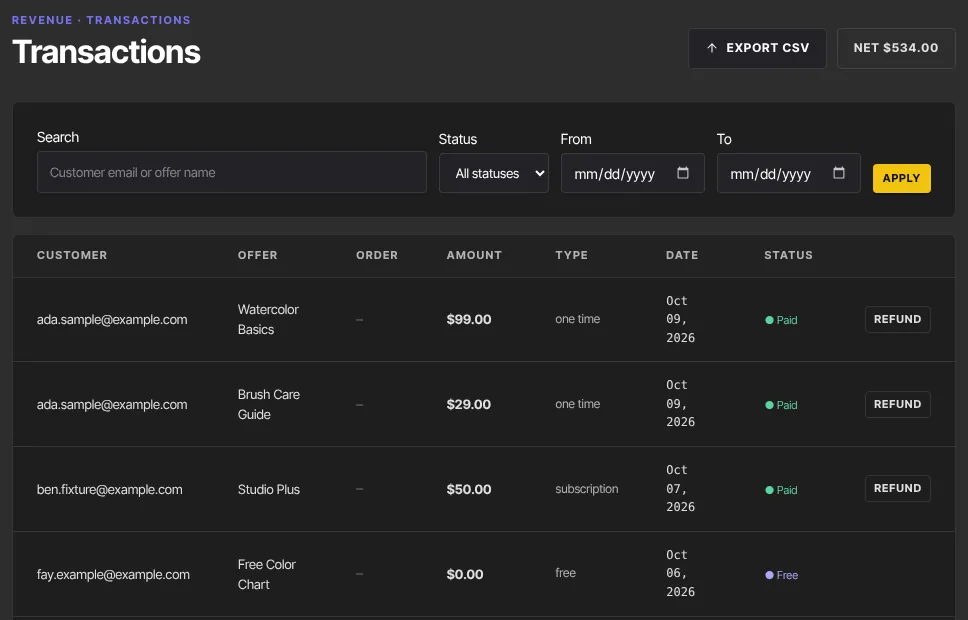
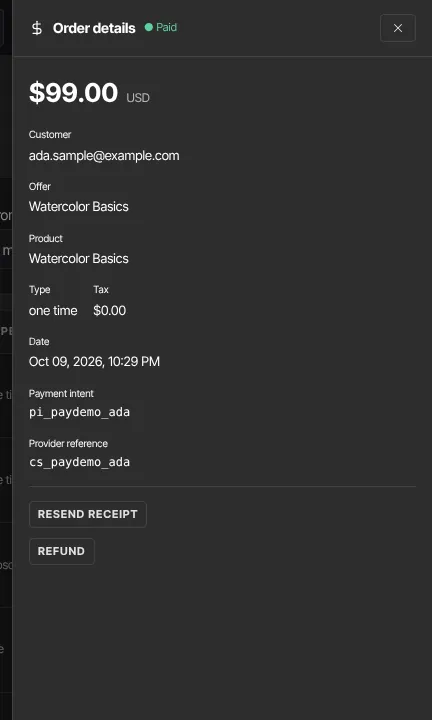
- Click a row to open Order details: the amount, customer, offer, product, tax, date, any extra checkout questions the buyer answered, and the payment reference.
Items bought together in the cart share an Order number. The list shows your 200 most recent matching orders, and Export CSV downloads the rows you're looking at, with a Refunded (USD) column. The Net figure at the top totals your paid orders, not counting tax and minus any partial refunds. A renewal payment that fails isn't listed here: see Failed subscription payments (dunning).
Resend a receipt
- Click the order to open Order details.
- Click Resend receipt, then Send receipt to confirm. The buyer gets the receipt again, with a fresh sign-in button.
This works on Paid and Free orders while Send purchase receipts is on. See Purchase receipts and their reply-to address.
Refund one line of an order
Each line of an order is refunded on its own. A buyer who bought a course with an order bump has two lines, so you can refund just the bump and leave the course alone.
- Find the line in Transactions, or open it in Order details.
- Click Refund. A prompt shows the amount and says "Other items in the same order are not affected."
- Click Confirm refund, or Cancel to back out.

- The line changes to Refunded.
Refund always refunds everything that's left on the line. On a line that was already partly refunded (see Give back part of a payment below), the prompt says how much is left, for example "Refund the remaining $90.00 for this line ($10.00 was already refunded)?", and only that is refunded. Refund appears on Paid lines from checkout, one-click upsells, membership payments and invoices: each invoice line is its own order, so a multi-line invoice is refunded line by line. Free orders and orders brought in from another platform don't have it.
Refund a membership payment
A line whose type is subscription refunds the same way, but its prompt warns: "This also cancels the membership now and removes the member's access." After you confirm, the membership is cancelled straight away: it won't bill again, and the member loses the products it gave them right away, not at the end of the period they paid for. Products they own another way (a separate purchase, another membership) stay. A partial refund of a membership charge (below) doesn't cancel it, and the member keeps access.
Refund a payment-plan installment
Each installment of a payment plan is its own subscription line, and refunding one works the same way, with the same warning. It ends the whole plan straight away: no more installments are taken, and the buyer loses the products the plan gave them right away. That includes a plan that's already paid off: once an installment is refunded the plan no longer counts as paid in full, so the access they'd have kept for good ends too. To give back part of an installment and keep the plan going, ask for a partial refund (below).
Give back part of a payment (partial refunds)
The Refund button can't give back part of a line. Your sales are charged through Zinstruct's Stripe account, so you can't make a partial refund in Stripe yourself either: to give a buyer back part of what they paid, contact Zinstruct support with the order and the amount. They keep the course. When a partial refund is made, say $10 back on a $100 course, it's recorded on that line:
- Transactions shows "−$10.00 refunded" under the line's amount, and Order details shows Partly refunded. The line stays Paid.
- The buyer keeps access.
- Your net revenue drops by $10, including the Net figure on Transactions.
- You get an "Order partly refunded — $10.00 of $100.00" email, under the Refund issued box in your notification settings.
- The Payment is refunded automation trigger and the
transaction.refundedwebhook fire, markedpartial: true. - An affiliate commission on the sale stays as it is.
Clicking Refund on that line afterwards refunds only what's left. On an order with several lines, a partial refund that covers whole lines refunds those lines in full, and any amount left over is recorded on the largest remaining line as above.
If a buyer was charged twice
Each checkout is its own order, so a buyer who paid twice has two Paid orders in Revenue → Transactions. Refund the extra one: open it and click Refund. They keep access through the order you didn't refund.
Chargebacks and disputes
- When a buyer disputes a charge with their bank, the order changes to Disputed. Pick Disputed under Status to list them all.

- You get a Chargeback opened email ("A buyer disputed a charge") with the buyer, product, amount and, when the bank gives one, the date evidence is due. Its View disputed orders button opens this list.
- Reply to that email with anything that shows the purchase was genuine: receipts, messages, proof the buyer used the course. The payment went through Zinstruct's Stripe account, so the dispute is held there, and your reply goes to Zinstruct support.
The buyer keeps access while the dispute is open, and a disputed order has no Refund button. It isn't counted in the Net figure until the bank decides. A line you'd already refunded, such as a refunded order bump next to the disputed course, stays Refunded throughout. An unpaid affiliate commission on the order is held while the dispute is open: it isn't batched or paid. When the bank decides:
- Won, or an inquiry that closes without a chargeback: the order goes back to Paid, or stays Refunded if you'd already refunded it. A held commission goes back to pending.
- Lost: the order becomes Refunded and is treated like a refund (see below).
Disputes also send a charge.disputed event to your webhooks. There's no automation trigger for disputes.
Payments that take a few days
If a buyer pays with a method that takes days to clear, such as a bank debit, the order appears here, and they get access and a receipt, only once the payment clears. If it fails, nothing is granted and you get a Failed payment email. Zinstruct doesn't email the buyer.
What happens next
After a refund, or a lost dispute:
- The money goes back to the buyer. The amount comes back out of your Stripe balance, and the platform fee on it is returned to you, so neither of you keeps money from that sale.
- The buyer loses the products that line gave them, unless they also have them another way, such as another purchase or an active membership.
- An unpaid affiliate commission on it is voided. One already paid is clawed back: a negative Clawback line comes off the partner's next payout.
- After a refund you get a Refund issued email ("A refund was issued"), and the Payment is refunded automation trigger fires. A lost dispute sends neither: it sends the
charge.disputedwebhook event only. Zinstruct doesn't email the buyer, so let them know yourself. - The buyer usually sees the money back within 5 to 10 business days, depending on their bank.
- The order stays in Transactions as a record, marked Refunded.
Common errors
- "You don’t have permission to issue refunds.": you're staff or a viewer. Ask an owner or admin.
- "Only a succeeded charge can be refunded.": the line is already refunded, disputed or free. Reload the page.
- "No payment to refund." or "Order not found.": there's no payment to reverse, or the order was removed. Reload the page.
- "Nothing is left to refund on this line.": everything on the line has already been refunded. Reload the page.
- "Stripe could not process the refund. Try again or check the Stripe dashboard.": nothing was refunded. Try again in a moment.
- "Refund issued, but the subscription could not be cancelled automatically. Check Memberships in a minute and cancel it there if it is still active.": the money was returned, but cancelling the membership didn't go through. Open Revenue → Memberships after a minute and cancel it there if it's still active.
- "Receipts only apply to completed orders." or "Receipts are turned off in Settings → Payments.": only Paid and Free orders have receipts, and Send purchase receipts must be on, on Customer payments.
- "Your free trial has ended, so your workspace is read-only…": subscribe in Settings → Billing to refund again.