Right after a purchase or free claim, the buyer gets one email with a button that signs them straight into their library. By default it's the standard receipt. For each offer you can send your own message instead, or nothing at all. You can also resend a receipt from the order.
Who can do this
- Owners and admins choose an offer's post-purchase email and change the receipt's wording.
- Owners, admins and staff can resend a receipt. Viewers see "You don’t have permission for this."
- Available on every plan.
What buyers receive by default
- A paid one-time purchase: "Your purchase is confirmed", listing the offer, any order bumps and accepted add-ons with the total, and a Go to your courses button. If the offer has upsells, it's sent when the buyer finishes the upsell steps and reaches the confirmation page (or your after-purchase page), so it can list everything they added. A buyer who leaves partway through gets it 30 minutes after their first payment.
- A free claim: "You're in —" followed by the product's name.
- Subscriptions and payment plans: a "You're in —" receipt for every successful payment, first and renewals. These use the standard receipt; the offer's Email tab doesn't change them. The exception is an offer with upsells: the first payment and any add-ons accepted after it share one "Your purchase is confirmed" receipt, sent when the buyer finishes the upsell steps, and that receipt follows the Email tab like a one-time purchase. Renewals always get the standard receipt.
- A free trial start: no receipt. The member gets "Your subscription is set up" with their first payment date. If they accept an add-on straight after the trial checkout, one receipt lists the add-ons.
- A gift: the buyer gets the receipt and the recipient gets a gift email.
- Cart and invoice purchases: one receipt per item. Only the newest email's sign-in button is sure to work; buyers can always sign in with an emailed code instead.
Choose this offer's post-purchase email
- Open the offer from Revenue → Offers and click the Email tab.
- Choose Default email (the standard receipt), Custom email (your own message replaces the receipt) or None (send nothing).
- For a custom email, fill in Custom subject and Custom message. It's plain text; a blank line starts a new paragraph. A "Go to your library" button is added automatically.
- Click Save post-purchase email. No message confirms it; the page refreshes with your choice.
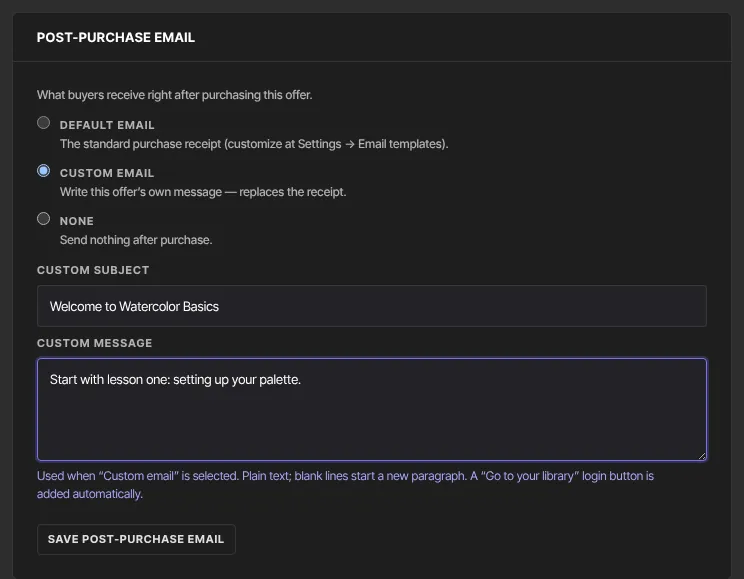
With None, buyers get no access email; they sign in at your member sign-in page with an emailed code. A custom email is sent even when purchase receipts are turned off.
Change the standard receipt's wording
- Go to Settings → Email templates and find Purchase receipt.
- Enter a Subject (blank keeps the default) and an Intro message, which is added to the top.
- Click Save email templates.
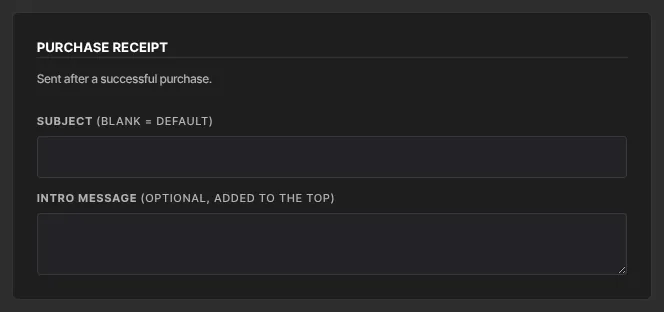
To stop standard receipts and gift emails altogether, untick Send purchase receipts in Settings → Customer payments. That page also sets the Support / reply-to email that buyers' replies go to.
Resend a receipt
- Go to Revenue → Transactions and click the order's row. Order details opens.
- Click Resend receipt. It asks "Email the receipt for" the amount "to" the customer's email "again?".
- Click Send receipt (it shows Sending…).
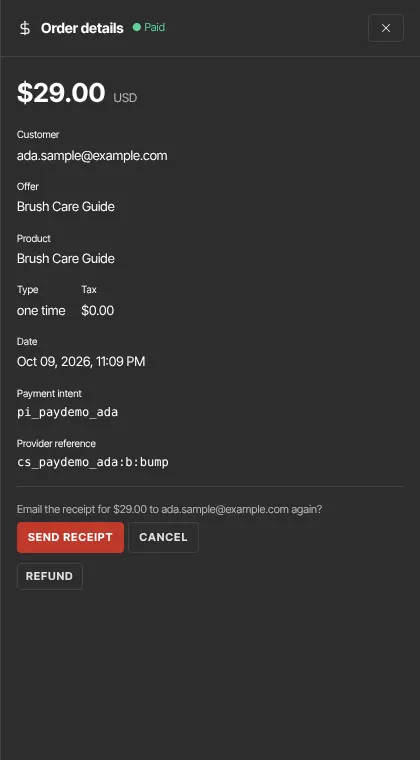
The standard receipt goes again with a fresh sign-in button, even for offers set to Custom email or None. Resending works for completed and free orders.
What happens next
- The buyer's button signs them straight into their library. If it has expired, they're offered a fresh code and link.
- Replies go to the reply-to address set in Settings → Customer payments.
Common errors
- "Receipts only apply to completed orders.": refunded or failed orders can't be receipted.
- "This order has no customer or product to receipt.": the order's contact or product was deleted.
- "Receipts are turned off in Settings → Payments.": tick Send purchase receipts in Settings → Customer payments, then resend.
- "You don’t have permission for this.": viewers can't resend receipts.
- A buyer says nothing arrived: check their spam folder, whether the offer is set to None, and whether receipts are turned off. A buyer who left partway through the upsell steps gets the receipt 30 minutes after paying.