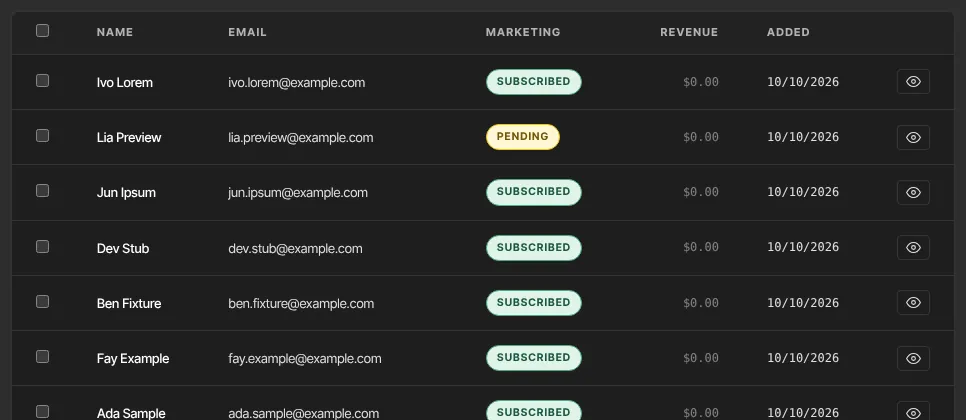
Every contact has a marketing status that decides whether they get your marketing email. You see it as subscribed, unsubscribed or pending in the Marketing column of your Contacts list and on each contact's record. Keeping it accurate protects your sender reputation and keeps you within anti-spam law.
Who can do this
- Staff, admins and owners can change a contact's marketing status, one at a time or in bulk.
- Viewers can see it but not change it: they get "You don’t have permission for this."
- Contacts change their own status by unsubscribing, or by signing up again through one of your forms.
What each status means
- subscribed: gets your broadcasts, sequence emails, newsletter issues, course announcement emails and automation emails.
- unsubscribed: gets none of those. Contacts start here unless they opted in.
- pending: signed up through a form that uses double opt-in and hasn't clicked the confirmation link yet. Treated like unsubscribed until they confirm. See Forms and opt-ins.
Whatever their status, people still get account email such as receipts and sign-in codes.
Change it for one contact
- Open the contact's record. On the Info tab, set Marketing to Subscribed or Unsubscribed.
- Click Save changes. The panel shows Saved.
For a pending contact this box shows Pending (waiting for them to confirm). Leave it to keep them pending, or pick Subscribed or Unsubscribed.
Change it for many contacts
- On Contacts → All people, tick the contacts.
- Click Subscribe or Unsubscribe in the bulk actions bar. It says Subscribed N contacts. or Unsubscribed N contacts.
More in Change many contacts at once.
Set it when you add someone
- On the New contact form, under Subscriptions, tick Subscribe to marketing emails only if the person agreed. Unticked means unsubscribed.
- Subscribe to the newsletter is saved on the contact, but it doesn't decide who gets newsletter issues: issues go to people with access to the newsletter product whose marketing status is subscribed.

How contacts unsubscribe themselves
- Every marketing email has an Unsubscribe link at the bottom. Mail apps such as Gmail can also show their own unsubscribe button.
- The link opens a page titled Unsubscribe from emails? with an Unsubscribe button. Nothing changes until they click it.
- The page then says You’re unsubscribed. Their status becomes unsubscribed and their email sequences stop.
Spam complaints and bounces
- Marked as spam: the contact is set to unsubscribed, their sequences stop, and their Lifecycle tab says Marked an email as spam — unsubscribed from marketing. We keep blocking marketing email to that address even if you set them back to subscribed. Receipts and sign-in codes still go out.
- Hard bounce (the address doesn't exist): nothing more is sent to it, not even receipts, and the timeline says Email address bounced — no email can be delivered to it. The contact still shows as subscribed, so they're counted in a broadcast's recipient total and then appear in its "not sent" count. Correct a mistyped address on their record; for the same address, ask Zinstruct support to lift the block.
- You can't see or edit the list of blocked addresses, and we don't email you when a contact bounces or complains. Only Zinstruct support can lift a block. Some blocks apply across all of Zinstruct, so an address can be blocked before you ever emailed it.
More in Sending domains and deliverability.
What happens next
- A change applies straight away: an unsubscribed contact is left out of your next broadcast, and their sequence stops before its next email.
- To get back on your list, a contact can sign up again through one of your forms. A form with double opt-in sets them to pending until they confirm.
- Only set someone back to subscribed if they asked you to. Re-subscribing a person who unsubscribed can break anti-spam law.
Common errors
- "You don’t have permission for this.": viewers can't change marketing status.
- "Pick subscribed or unsubscribed.": click the button again.
- "Could not update those contacts. Please try again.": a problem on our side. Try again.
- A subscribed contact isn't getting your emails: they may have marked an email as spam, or their address bounced. Check their Lifecycle tab.
- The unsubscribe page says "Link not valid": the link was damaged, often by an email app. Unsubscribe the contact yourself on their record.