Deleting a contact removes the person from your list for good. It's meant for test entries, junk sign-ups and duplicates. It can't be undone, and it also takes away their access to every product. If you only want to stop emailing someone, unsubscribe them instead.
Who can do this
Only owners and admins can delete contacts. Staff and viewers see the same buttons but are refused: on a record a pop-up says "You don’t have permission to do that.", and on the Contacts list the bar says "You don’t have permission for this." Nothing is deleted.
Delete one contact
- Open the contact's record.
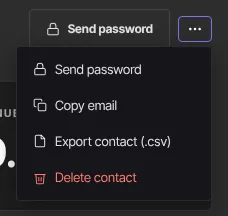
- Click More actions (⋮) at the top right, then Delete contact.
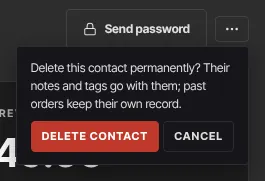
- The menu asks: "Delete this contact permanently? Their notes and tags go with them; past orders keep their own record."
- Click Delete contact to confirm, or Cancel (or press Escape) to back out.
- You return to the Contacts list.
Delete several contacts
- On Contacts → All people, tick the rows you want to delete (up to 100, all on the current page).
- Click Delete in the bulk actions bar.
- The bar says Deleted N contacts.
This one has no confirmation step: the contacts are deleted the moment you click. Check your selection first. More about selecting in Change many contacts at once.
What gets deleted
- The contact, their notes, their tags and their Lifecycle timeline.
- All their product access. They can no longer open courses, communities or anything else they bought or were given. The confirmation message doesn't mention this.
- Custom fields an import saved for them.
What stays:
- Their orders stay under Transactions, no longer linked to a contact, so your revenue figures don't change.
- Any login they used to sign in to your member area. It just has nothing in it.
Before you delete
- To stop emailing someone, set Marketing to Unsubscribed on their record instead. You keep their history and their access. See Email preferences and unsubscribes.
- To take away one product rather than everything, see Give or remove product access by hand.
- To keep a copy, click More actions → Export contact (.csv) first.
What happens next
- We don't email the person.
- If they buy from you or sign in to your school again later, they come back as a new contact with no history and no access. Their earlier orders aren't linked back to them.
- Segments and broadcasts simply stop including them.
Common errors
- "You don’t have permission to do that." or "You don’t have permission for this.": only owners and admins can delete contacts.
- "Select at least one contact.": tick at least one row first.
- "Could not delete those contacts. Please try again.": a problem on our side. Try again.
- "Your free trial has ended, so your workspace is read-only. Subscribe in Settings → Billing to start creating again — nothing has been deleted.": subscribe to make changes again. See Plans and billing.