The signed-in JSON API can also read and build your catalog: products, a course's modules and lessons, and enrollments. Use it from a browser where you're signed in to the admin app, for example to add many lessons at once or to mark lessons complete for a student. How to send requests, page through lists and read errors is in Manage contacts, offers and webhook endpoints with the signed-in JSON API.
Who can do this
It works only with a signed-in session on https://app.zinstruct.com, never with an API key. By role:
- Read products, modules, lessons and outlines: any team member.
- Create and edit products, modules and lessons, enroll contacts, and mark lessons complete: staff, admins and the owner.
- Publish or unpublish an existing product, and delete products, modules or lessons: admins and the owner. Staff get
403"Not allowed". - Viewers get
403"Not allowed" when they create or edit. When a viewer tries to enroll a contact or mark a lesson complete, the request fails with500"Something went wrong" instead. Either way nothing changes. - In a read-only workspace, requests that change data get the
402"Your free trial has ended" page.
Read your catalog
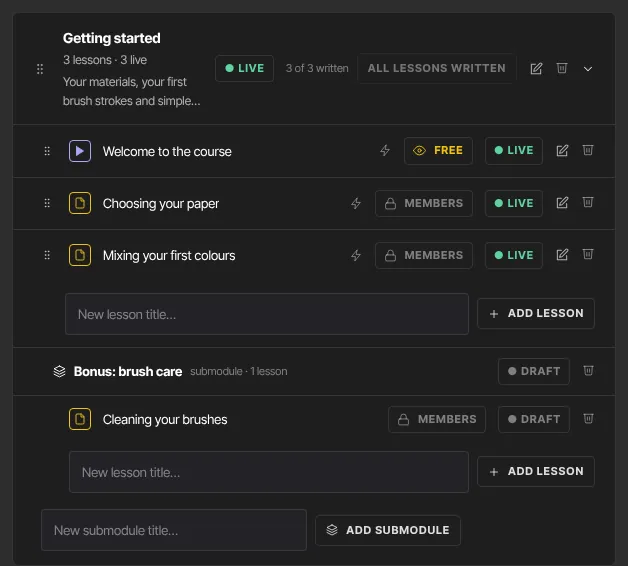
GET /api/v1/products: your products, newest first, a page at a time. Filter with?type=.GET /api/v1/products/{id}: one product.GET /api/v1/products/{id}/outline: the product with its modules and their lessons, in order, in one reply.GET /api/v1/products/{id}/modules: its modules, in order.GET /api/v1/modules/{id},GET /api/v1/modules/{id}/lessonsandGET /api/v1/lessons/{id}: one module, its lessons, or one lesson.
Create and edit
- Create a product:
POST /api/v1/productswithtype(course,coaching,community,podcast,newsletterordownload) andtitle, and optionallysub_type,descriptionandsettings. Without astatusit's created as a draft. Only the product itself is created: no offer and no modules. Acommunityproduct also gets its Access group and a General space straight away, as it does when you make it with the New product steps, so enrolled members can get in. - Add a module:
POST /api/v1/products/{id}/moduleswithtitle, and optionallydescription,position,status,parent_id(to make it a submodule) andavailability_rule. - Add a lesson:
POST /api/v1/modules/{id}/lessonswithtitle, and optionallyposition,status,body,media_asset_id,comments_mode(visible,hiddenorlocked) andavailability_rule. - Edit:
PATCH /api/v1/products/{id},/api/v1/modules/{id}or/api/v1/lessons/{id}with the fields to change (at least one). - Publish or unpublish a product:
PATCH /api/v1/products/{id}withstatusset topublishedordraft(admins and the owner). This only changes the status (publishing acommunityproduct also sets up its Access group and General space if either is missing). Unlike the Unpublish button in the course builder, it doesn't end a live room that's running and doesn't sendproduct.unpublished, so use the button when you need those.
Delete
DELETE /api/v1/products/{id}: deletes the product with its modules, lessons and offers. It only works when nobody has the product and it has never been sold; otherwise it answers409with "This product has … so it can’t be deleted … Archive it instead." (archive it from its Settings tab; see Products overview). A live room running for it is ended first. There's no undo.DELETE /api/v1/modules/{id}: deletes the module and its lessons.DELETE /api/v1/lessons/{id}: deletes one lesson.
A successful delete answers 204 with no body.
Enroll a contact and record progress
- Enroll:
POST /api/v1/products/{id}/enrollwith{ "contact_id": "…" }. The contact gets access straight away and any drip schedule starts. No sale is recorded, and no receipt or access email is sent. The reply includes the new enrollment'sid. - Mark a lesson complete:
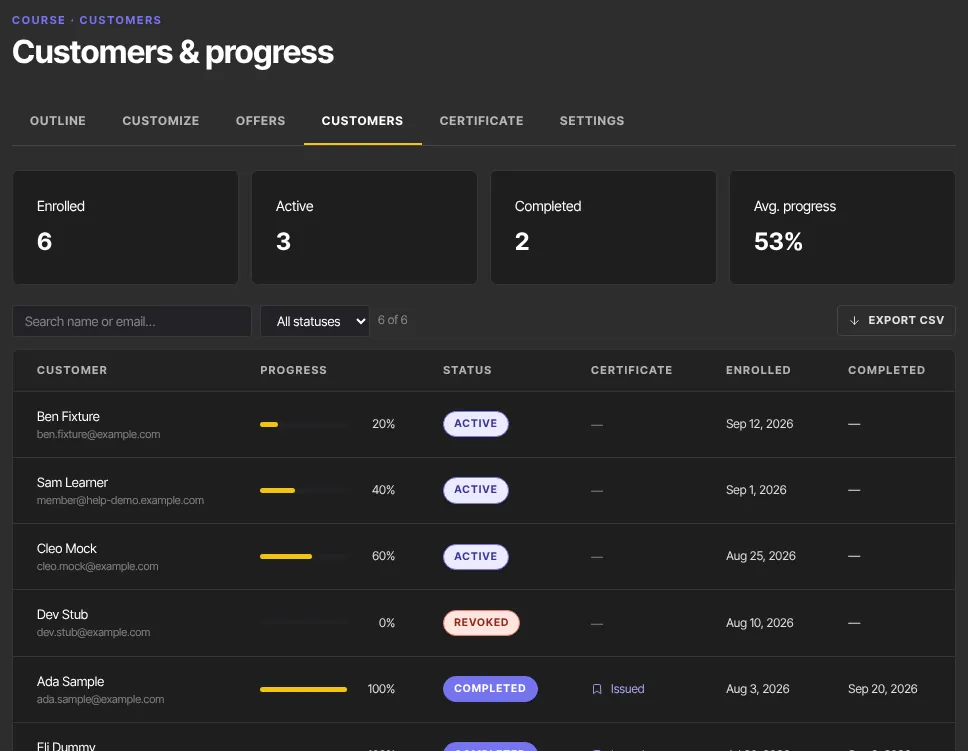
POST /api/v1/lessons/{id}/completewith{ "enrollment_id": "…" }. The lesson must belong to that enrollment's product. Progress is recalculated. At 100% the course counts as completed andcourse.completedis sent; if the course has certificates turned on, a certificate is issued and emailed andcertificate.issuedis sent. - Check
newly_completedin the reply:truethe first time,falseif the lesson was already complete. A repeat still sends anotherlesson.completedevent to your webhooks and automations, and on a course the student has already finished it sendscourse.completedandcertificate.issuedagain and re-sends the certificate email. Don't repeat it needlessly.
For enrollments that already exist, find their ids with the enrollments list in the key-based API.
What happens next
- Each change sends the matching event to your webhooks:
product.created,product.updatedorproduct.deleted;module.created,module.updatedormodule.deleted;lesson.created,lesson.updatedorlesson.deleted;enrollment.created; andlesson.completed, followed bycourse.completedandcertificate.issuedwhen a course is finished. - When a lesson you add or change is published and drips, or you change a course's
sub_typeorsettings(such as its cohort start), the "new lesson unlocked" emails of students already enrolled are re-planned to match. Nothing already announced is sent again. See Set the time dripped lessons unlock. - Students enrolled in a published product find it in their library, and see the progress you record.
Common errors
- "Product not found", "Module not found", "Lesson not found", "Contact not found" or "Enrollment not found" (404): the id is wrong, or belongs to another workspace.
- "Contact is already enrolled" (409): the contact already has this product.
- "Request validation failed" (400): the body is wrong;
detailssays which field. When the lesson isn't in the enrollment's product,detailssays "Lesson does not belong to this enrollment’s product". - "Not allowed" (403): your role can't do this, for example a staff member publishing or deleting.
- "Authentication required" (401): you're not signed in in this browser.
- "Something went wrong" (500): try again. For a viewer enrolling a contact or completing a lesson, it means the role can't do this.
- "Your free trial has ended" (402 page): the workspace is read-only. Choose a plan to make changes.