This is for the developer, or the tool, that uses an API key. It explains how every request is built: the address, where the key goes, how lists come back in pages, what errors look like and how many requests you can make. The full list of requests is in the API reference; this article covers the rules they all follow.
Who can do this
- Anyone holding a key the workspace owner created (see API keys). The API acts for the workspace, not for a person, so nobody needs to be signed in.
- The workspace must be in service and on a paid plan (Core, Advanced or Professional). Every request checks this again, so a key stops working the moment that changes.
- Keys created in Settings can only read. Requests that change data are refused (see below).
- Reading the reference in the app needs an owner or admin. Staff and viewers see "Only owners and admins can view the API reference."; the Download PDF button still shows at the top of that page.
Make your first request
- Get a key from the workspace owner.
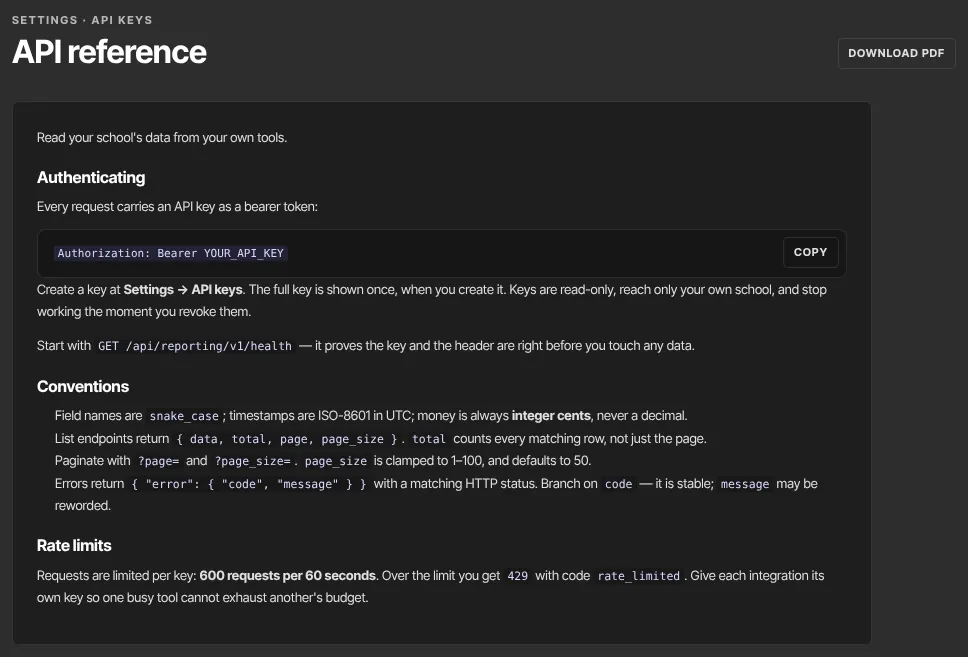
- Use your admin app's address as the base:
https://app.zinstruct.com. The examples on the reference page already use the address you're viewing it on. The downloadable PDF uses one fixed address in its examples; if it differs from your admin app's address, use your admin app's. - Send the key in the
Authorizationheader: the wordBearer, a space, then the key, as inAuthorization: Bearer lek_…. - Call the key check first:
GET https://app.zinstruct.com/api/reporting/v1/health. A working key gets back{ "ok": true }, and no data is touched. - Then call the requests you need. The reference groups them under Getting started, Core data and Engagement.
The same rules and the full reference are also public, with no sign-in, at developers.zinstruct.com, along with an openapi.json file you can import into Postman or a code generator.
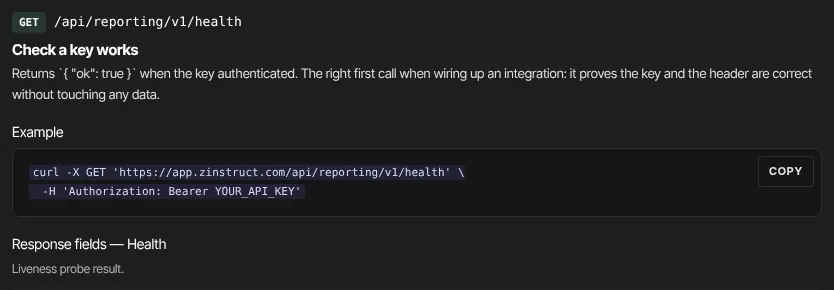
On the reference page, choose cURL, JavaScript, Python, PHP, Ruby or Go under Language to switch every example, and use the Copy button on an example to copy it.

Read lists a page at a time
- Lists return
data(the rows),total(every matching row, not just this page),pageandpage_size. - Ask for pages with
?page=(starting at 1) and?page_size=(1 to 100, default 50). A value outside that range is pulled back into it rather than refused. - To fetch everything, keep asking for the next page until a page comes back with fewer rows than
page_size. - Filters are exact matches:
?status=activereturns only rows whose status is exactlyactive. A value the field doesn't accept gives an empty list rather than an error, so if you get nothing back, check the spelling against the reference. - Field names are lower case with underscores, times are UTC in ISO-8601 format, and money is in whole cents:
4900means 49.00.
Errors and limits
- Every error comes back as
{ "error": { "code": "…", "message": "…" } }with a matching HTTP status. Build your tool aroundcode; the wording ofmessagecan change. - Each key can make 600 requests per 60 seconds. Over that you get
429with coderate_limited. Wait a moment, then carry on. - Every request a Settings key can make is a read, so retrying one is always safe.
Requests that change data
The API also has four requests that change data: updating a student's role, status or tags; adding a note to a student; flagging a lesson for review; and emailing a student a nudge. They need a key with the write scope, which Settings can't create, so they're left out of the reference. Sent with a Settings key, each one is refused. See Pull engagement reports with the API.
What happens next
- Each accepted request updates the key's Last used time on the owner's API keys page. Refused requests don't.
- Reading never changes anything in the school, sends an email or notifies anyone.
- To have changes sent to you instead of asking repeatedly, use webhooks.
Common errors
- "Missing or malformed Authorization: Bearer token." (401,
unauthorized): the header is missing, or isn'tBearer, a space and the key. - "Invalid or revoked token." (401,
unauthorized): the key is mistyped or was revoked. Ask the owner for a new one. - "This token lacks the 'write' scope." (403,
forbidden): the request changes data. Settings keys can only read. - "API access requires a paid plan (Core, Advanced or Professional). The workspace owner can upgrade in Settings → Billing." (403,
plan_required): the workspace's plan doesn't include the API right now. - "This workspace is not in service, so its API keys are disabled." (403,
workspace_unavailable): the workspace is suspended or closed. - "No contact with that id." and the like (404,
not_found): the id doesn't exist in this workspace. Ids from other workspaces are never found. - "Too many requests. Slow down." (429,
rate_limited): you went over 600 requests in 60 seconds. Wait, then retry. - "Could not build the summary." (500,
internal_error): a temporary problem on our side. Retry shortly.