The Engagement part of the API answers "who is learning, how far do they get, and where do they stop watching?" It gives you your school's headline numbers in one call, engagement per course and module, each student's activity and watch history, and the lessons where viewers drop off. Use it to feed a dashboard or a weekly report.
Who can do this
- A tool holding a key from Settings → API keys. Every Settings key can make the read requests here.
- The workspace must be on a paid plan (Core, Advanced or Professional) and in service.
- Keys created in Settings can't make the four requests that change data (last section).
Every request goes to https://app.zinstruct.com with Authorization: Bearer and your key; see Call the API.
Get your headline numbers
- Send
GET /api/reporting/v1/summary. - You get one object:
students,active_students_30d,paying_customers,courses,modules,lessons,logins_30d,avg_session_minutes,lessons_watched_over_30s_30dandcompletion_rate_pct.
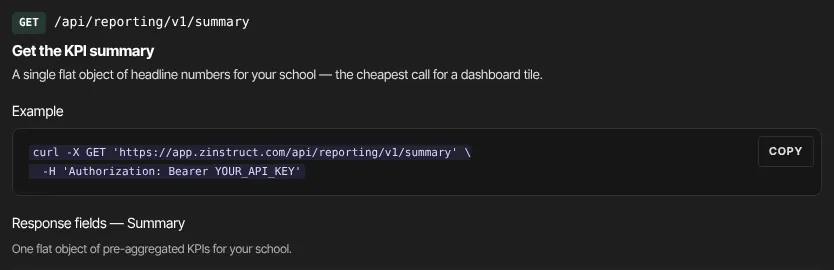
It's the cheapest call for a dashboard tile.
See engagement per course and module
- Send
GET /api/reporting/v1/coursesfor every course, a page at a time. Each hasmodules_count,lessons_count,students_enrolled,lessons_watched_over_30s,distinct_students_watchedandavg_completion_pct. - Send
GET /api/reporting/v1/courses/{course_id}/modulesfor one course's modules in their display order, each with its lesson count and watch activity.
See what each student is doing
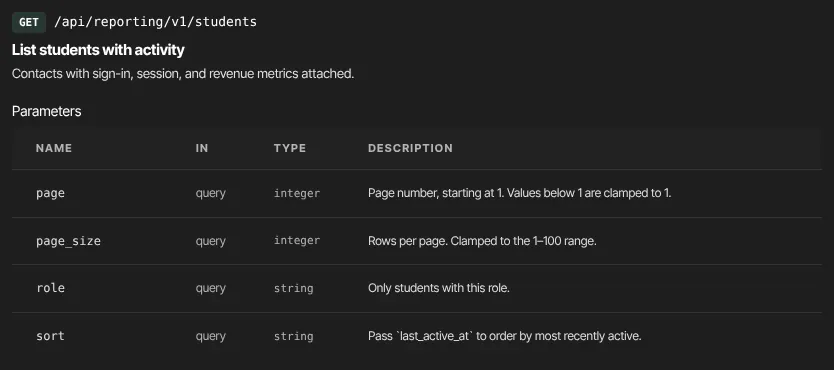
- Send
GET /api/reporting/v1/students. Filter with?role=, and add?sort=last_active_atto put the most recently active first. - Each student has
name,email,role,joined_at,last_active_at,logins_30d,avg_session_minutes,total_session_minutes_30d,payingandlifetime_revenue_cents. - Fetch one with
GET /api/reporting/v1/students/{student_id}. - Send
GET /api/reporting/v1/students/{student_id}/watch-historyfor every lesson that student has watched, newest first, withwatched_seconds,watched_pctandlast_watched_at.
Find where viewers drop off
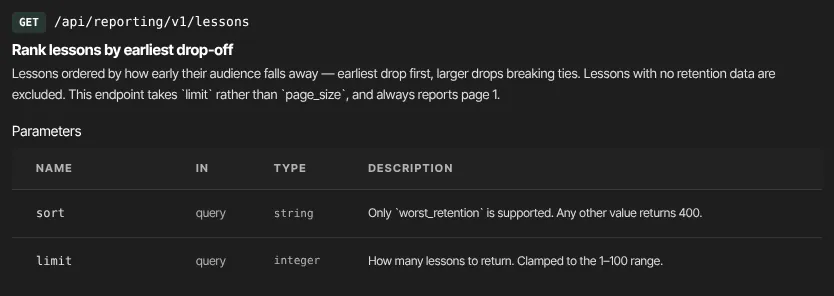
- Send
GET /api/reporting/v1/lessons?sort=worst_retention&limit=10. Lessons are ranked by how early in the lesson viewers drop off sharply.limitis 1 to 100, default 10. Lessons with no recorded viewing are left out. - Send
GET /api/reporting/v1/lessons/{lesson_id}/retentionfor one lesson:views,avg_watch_seconds,avg_watch_pct, theretentioncurve andbiggest_dropoff.
Use the result to decide which lesson to re-record or shorten first.
Requests that change data
The reporting API also has four requests that change data:
- update a student's role, status (
activeorarchived) or tags; - add a note to a student;
- flag a lesson for review, with an improvement note;
- email a student a nudge to come back.
They need a key with the write scope. Keys created in Settings → API keys are read-only, so these requests are refused with "This token lacks the 'write' scope." and they're left out of the reference.
A key that does have the write scope can send an Idempotency-Key header (8 to 200 characters) with these requests, so a retried request isn't applied twice: a repeat gets the first reply back, marked Idempotency-Replayed: true. The nudge email needs that header, and works only on accounts where nudges are switched on. Changes made this way don't trigger automations or webhooks.
What happens next
- Each accepted request updates the key's Last used time.
- Engagement numbers come from what students watch and how they sign in to the member area. A school with no recorded viewing returns zeros and empty lists.
- Nothing is changed or sent by the read requests.
Common errors
- "Course not found.", "Student not found." or "Lesson not found." (404): the id doesn't exist in this workspace.
- "Only ?sort=worst_retention is supported on /lessons." (400,
bad_request): leavesortout or set it toworst_retention. - "Could not build the summary." (500,
internal_error): a temporary problem on our side. Retry shortly. - "This token lacks the 'write' scope." (403,
forbidden): the request changes data, and Settings keys can only read. - "Invalid or revoked token." (401) or "Too many requests. Slow down." (429): see Call the API.