Besides the key-based API, the admin app has a JSON API that works with your own sign-in. Some admin screens use it behind the scenes, such as the contacts list's quick view and an offer's purchases export. You can also call it from a browser where you're signed in, to script bulk changes. This article covers contacts, offers and webhook endpoints; products, modules, lessons and enrollments are in Build courses with the signed-in JSON API.
Who can do this
It works only with a signed-in session on https://app.zinstruct.com. An API key doesn't work here: a request with only a key gets "Authentication required". These requests aren't in the API reference. What you can do depends on your role:
- Read contacts and offers: any team member (owner, admin, staff or viewer).
- Create and update contacts: staff, admins and the owner.
- Delete contacts, and create, update or delete offers: admins and the owner.
- Read, add, change or delete webhook endpoints: admins and the owner. Staff and viewers get an empty list, and "Endpoint not found" for a single endpoint. Adding an endpoint also needs the Professional plan, the same as the form on Settings → Webhooks.
- Anyone refused gets
403with "Not allowed". - In a read-only workspace (after a free trial ends), requests that change data get a
402page titled "Your free trial has ended".
Send a request
- Sign in to the admin app at
https://app.zinstruct.comin your browser. - From that browser, for example its developer console on an admin page, send requests to paths that start with
/api/v1/. Your sign-in goes with them automatically. - Send any body as JSON.
- A successful reply wraps the result in
data:{ "data": { … } }. A list addspage:{ "data": [ … ], "page": { "next": "…", "limit": 50 } }. - For the next page of a list, pass the
nextvalue back as?cursor=, and set the size with?limit=(1 to 100, default 50). Whennextisnull, you've reached the end.
Errors come back as { "error": { "code": "…", "message": "…", "details": … } }.
Contacts
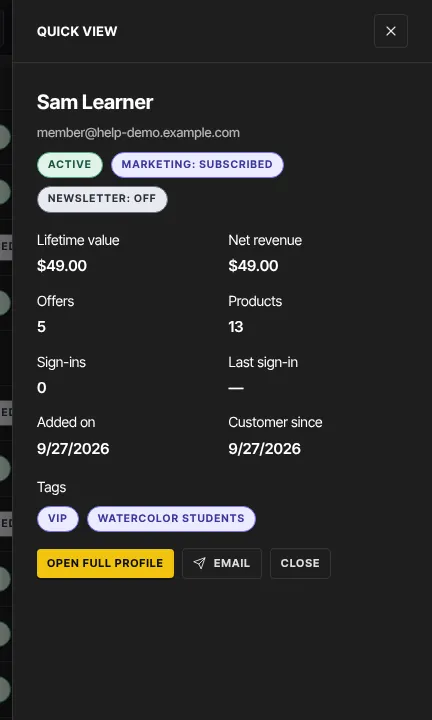
GET /api/v1/contacts: list contacts, newest first, a page at a time.GET /api/v1/contacts/{id}: one contact.GET /api/v1/contacts/{id}/summary: the numbers the contacts list's quick view shows, such as revenue, offers and products, sign-ins, status and tags.POST /api/v1/contacts: add a contact.emailis required; you can also sendfirst_name,last_name,name,phone,mobile_phone,comment,marketing_status(subscribedorunsubscribed),newsletter_subscribedandsource.PATCH /api/v1/contacts/{id}: change any of those fields (send at least one).DELETE /api/v1/contacts/{id}: delete a contact. It also removes their access to your products; their past sales stay in your records.
Offers
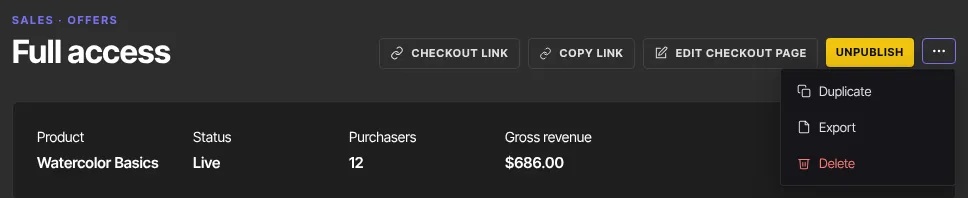
GET /api/v1/offers: your newest 200 offers, each with its product. This list has no pages.GET /api/v1/offers/{id}: one offer and its product.POST /api/v1/offersandPATCH /api/v1/offers/{id}: create or change an offer. The body is checked by the same rules as the offer form; the main fields areproduct_id,name,price_centsandplan(one_time,subscription,payment_planorfree).DELETE /api/v1/offers/{id}: delete an offer. Past sales stay in your records.GET /api/v1/offers/{id}/export: a CSV of the offer's purchases with Date, Status, Kind, Amount, Currency, Email and Reference. This is the Export item in an offer's More actions (⋮) menu, and any team member can use it.
Webhook endpoints
GET /api/v1/webhooksandGET /api/v1/webhooks/{id}: your endpoints, without their signing secrets.GET /api/v1/webhooks/event-types: every event you can subscribe to, in groups, with the payload version. Anyone signed in can read it.POST /api/v1/webhooks: add an endpoint withurl, and optionallydescriptionandevent_types(leave it empty for all events). Your plan must include webhooks (Professional). The reply includessecret. It's the only reply that does, so store it.PATCH /api/v1/webhooks/{id}: changedescription,event_typesorstatus(activeordisabled).DELETE /api/v1/webhooks/{id}: delete an endpoint and its delivery log. The reply is{ "data": { "deleted": true } }.
If your Webhooks page shows the hosted webhook portal, these requests keep the portal in step:
- An endpoint you add here is added to the portal too and receives events. The
secretin the reply is the portal's signing secret for it, so check thesvix-signatureheader with it. - A change or delete here is made in the portal first.
- If the portal refuses an add, change or delete, nothing is saved or changed, and you get a
500(see below). Try again.
What happens next
- Adding, changing or deleting a contact sends
contact.created,contact.updatedorcontact.deletedto your webhooks. Those events carry only the contact's id and your workspace's id. - Creating or changing an offer sends
offer.createdoroffer.updated. Deleting an offer sends nothing. - Webhook endpoint changes send no events, and nothing here sends an email.
Common errors
- "Authentication required" (401): you're not signed in in this browser, or you sent an API key instead.
- "Not allowed" (403): your role can't do this. Ask an admin or the owner.
- "Webhooks is included from the Professional plan up. Subscribe in Settings → Billing to unlock it." (403,
plan_required): you tried to add a webhook endpoint on a plan without webhooks. See Plans and billing. - "Request validation failed" (400): the body isn't valid JSON, or a field is wrong;
detailssays which. For offers it can include "A payment plan needs at least 2 installments." or "A paid price must be at least $0.99, or set it to $0 for a free offer." An empty change gives "At least one field is required". - "A contact with this email already exists" (409): use the existing contact, or change the email.
- "Contact not found", "Offer not found" or "Endpoint not found" (404): the id is wrong, or belongs to another workspace.
- "Endpoint URL must use https" and the other address messages from Set up webhooks appear under
detailswhen you add an endpoint. - "Could not register the endpoint with the webhook service. Nothing was saved — try again." (500): on an account with the hosted webhook portal, the portal refused the new endpoint. Nothing was added; send the request again.
- "Could not update the endpoint in the webhook service. Nothing was changed — try again." (500): the portal refused a change or delete. The endpoint is as it was; send the request again.
- "Something went wrong" (500): try again.
- "Your free trial has ended" (402 page): the workspace is read-only. Choose a plan to make changes.