The Core data part of the API gives a tool read access to the records your school runs on: contacts, products, offers (your prices) and enrollments (who has access to what, and how far they've got). Use it to copy your student list into a spreadsheet or CRM, or to check someone's access from your own app.
Who can do this
- A tool holding a key from Settings → API keys. Every Settings key can make these requests.
- The workspace must be on a paid plan (Core, Advanced or Professional) and in service. See API keys.
- These requests only read. Nothing here adds, changes or deletes a record.
Every request below goes to https://app.zinstruct.com with the header Authorization: Bearer and your key, as described in Call the API.
List and fetch contacts
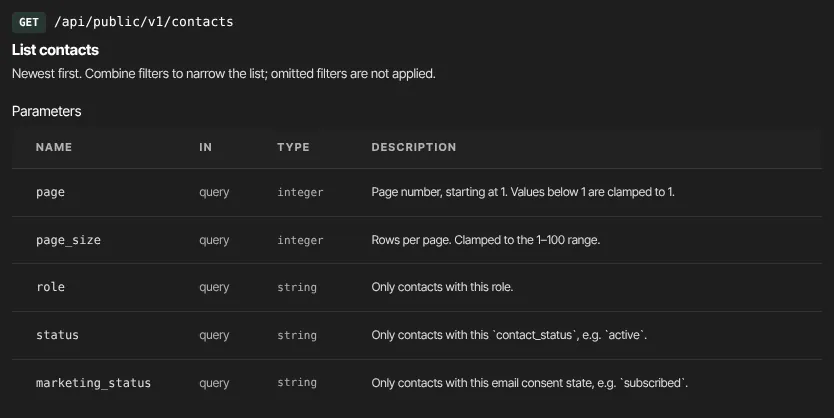
- Send
GET /api/public/v1/contacts. - Narrow it down if you like:
?role=,?status=(the contact's status, for exampleactive) and?marketing_status=(for examplesubscribedorunsubscribed). - Page through with
?page=and?page_size=(up to 100). The reply is{ data, total, page, page_size }, newest contacts first. - To fetch one contact, send
GET /api/public/v1/contacts/{id}. It returns that contact on its own, without thedatawrapper.
Each contact has id, email, name, first_name, last_name, role, phone, contact_status, marketing_status, source, lifetime_value_cents, created_at and last_activity_at. Payment details, tax IDs and postal addresses are never included.
List and fetch products
- Send
GET /api/public/v1/products. - Filter with
?type=(course,coaching,community,podcast,newsletterordownload) and?status=(draftorpublished). - Fetch one with
GET /api/public/v1/products/{id}.
Each product has id, type, sub_type, title, description, status, created_at and updated_at.
List and fetch offers
- Send
GET /api/public/v1/offers. - Filter with
?product_id=(offers that sell that product) and?status=. - Fetch one with
GET /api/public/v1/offers/{id}.
Each offer has its product_id, name, description, price_cents, currency, plan (one_time, subscription, payment_plan or free), interval and interval_count for repeating prices, pwyw (pay what you want), trial_days, status and its dates.
List and fetch enrollments
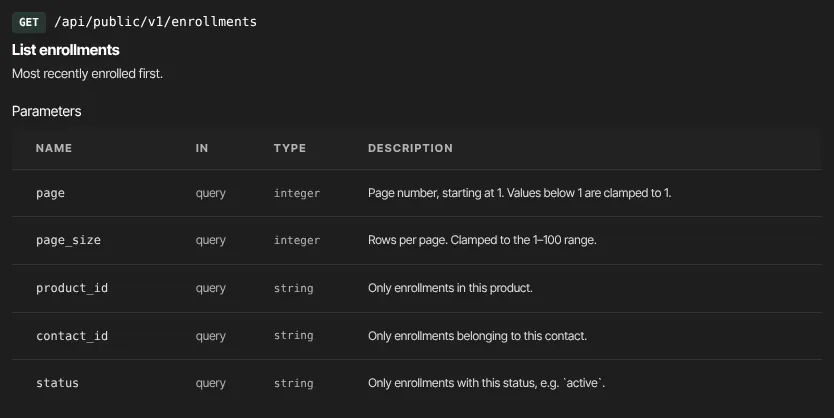
- Send
GET /api/public/v1/enrollments. - Filter with
?product_id=,?contact_id=and?status=(for exampleactive). The newest enrollments come first. - Fetch one with
GET /api/public/v1/enrollments/{id}.
Each enrollment has contact_id, product_id, granted_via_offer_id (the offer that gave access, if any), status, progress_pct, enrolled_at and completed_at.
Common recipes
- Everyone with access to a course: list enrollments with
?product_id=and?status=active, then fetch eachcontact_id. - Everything one person has: list enrollments with
?contact_id=. - A nightly copy of your list: page through contacts until a page has fewer rows than
page_size.
What happens next
- Each accepted request updates the key's Last used time on Settings → API keys.
- Reading doesn't change anything or notify anyone.
- To be told the moment a contact is added or someone buys, use webhooks instead of asking again and again.
Common errors
- "No contact with that id.", "No product with that id.", "No offer with that id." or "No enrollment with that id." (404): the id doesn't exist in this workspace. Check you copied it whole.
- An empty list when you expected rows: a filter value the field doesn't accept returns an empty list rather than an error. Check the spelling against the reference.
- "Invalid or revoked token." (401): ask the owner for a working key.
- "API access requires a paid plan (Core, Advanced or Professional). The workspace owner can upgrade in Settings → Billing." (403): the plan doesn't include the API right now.
- "Too many requests. Slow down." (429): wait a moment, then continue.