Membership metrics is the recurring-revenue view of your school. It shows how much your memberships bring in each month, how many members you're losing, what a subscriber is worth over time, and how long each month's sign-ups stay. Use it to tell a membership that's growing from one that's quietly leaking.
Who can do this
- Every team member can open it: owners, admins, staff and viewers.
- It works on any plan, including the free trial.
- It reads your membership subscriptions only. One-time sales appear on the Analytics dashboard instead.
Open Membership metrics
- In the sidebar, click Analytics, then click Subscriptions at the top right (
/analytics/subscriptions). - The page is titled Membership metrics.
- To see the subscriptions behind the numbers, click Raw subscriptions report. It opens Reports with the Memberships report picked.
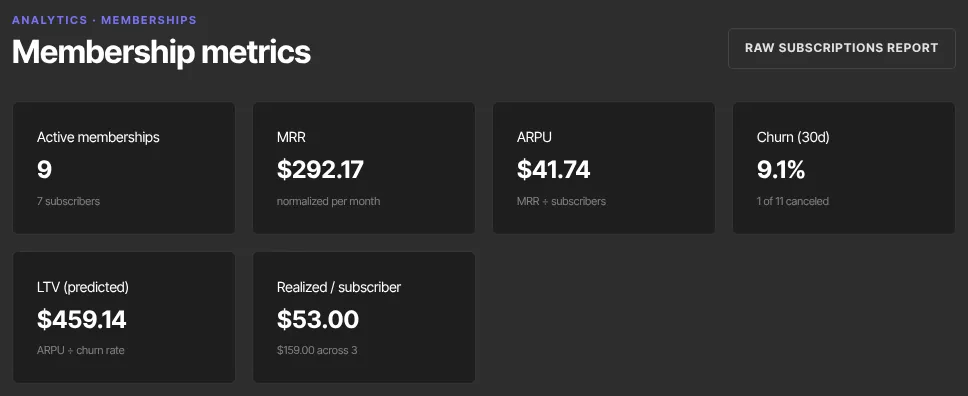
The tiles
- Active memberships: memberships that give access right now: paying, in a free trial, or with a payment being retried. The line underneath counts subscribers, so one person with two memberships counts once there, and says how many are in a free trial.
- MRR: monthly recurring revenue from paying memberships. Every price is turned into a monthly figure: a yearly plan counts as a twelfth, a plan billed every 3 months as a third. A free trial joins MRR when its first payment goes through. A membership with a payment being retried (past due) stays in MRR until it ends.
- ARPU: average revenue per paying subscriber per month, which is MRR divided by the people paying for a membership.
- Churn (30d): of the memberships that were live 30 days ago, the share that ended since: cancelled, or ended as Unpaid after every payment retry failed. The line underneath shows the counts, such as "2 of 10 ended (1 after failed payments)".
- LTV (predicted): ARPU divided by the churn rate, an estimate of what a subscriber is worth over their whole membership. With low churn, a small change moves it a lot, so treat it as a rough guide.
- Realized / subscriber: what subscribers have actually paid you so far, on average: all successful membership payments, less any part refunded, divided by the number of people who made them. A payment refunded in full isn't counted. The line underneath gives the total and the number of people.
A few things to know about what's counted:
- Payment plans aren't memberships here. They're a fixed price paid in installments, so they're left out of every tile, Active by offer and the cohorts, and finishing one isn't churn.
- The same MRR everywhere: the MRR tile on the Analytics dashboard and the total at the top of Revenue → Memberships use these same rules, so all three match.
- MRR is after discounts that last for more than one payment, such as "20% off for 3 months" accepted in your cancel flow or a coupon used at checkout. When the discount runs out, that membership counts at full price again. A discount on a single payment isn't taken off.
Read Active by offer and the retention cohorts
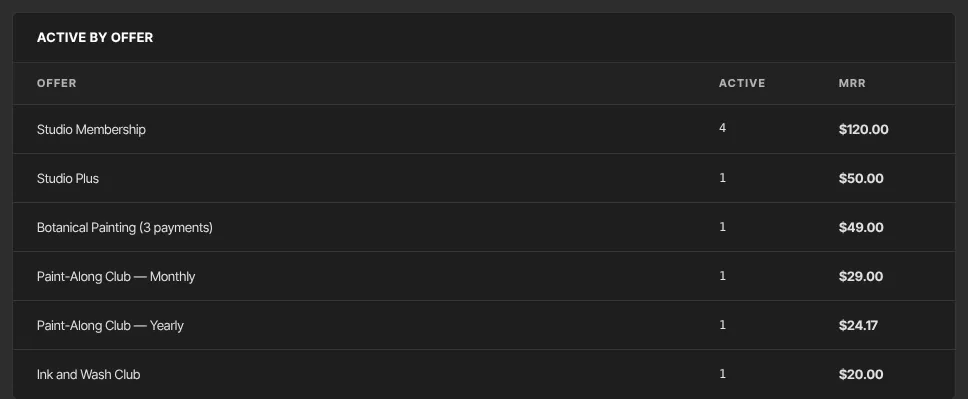
- Active by offer lists each membership offer with its Active count and MRR, biggest first.
- Retention cohorts has one row per sign-up month. Size is how many memberships started that month.
- Column M0 is always 100%. M1, M2 and the rest show the share of that month's memberships still going after 1, 2 or more months, where a month is 30 days. Darker cells mean better retention.
- Each row stops at the furthest month its oldest membership could have reached, up to 12, so recent months have fewer columns. On a narrow screen, scroll the table sideways.
Flat rows mean people stay. Rows that fade fast mean you're replacing members about as quickly as you sign them up.
What this page reads
- The MRR tile on the main Analytics page is worked out the same way, so the two match.
- This page reads every membership and every membership payment, so Realized / subscriber covers your whole payment history.
- Amounts are added up as they are and shown with a $ sign. If you sell in more than one currency, they aren't converted.
What happens next
The page only reads your data. New sign-ups, cancellations and renewals show up the next time you load it. To keep more of the members you have, look at Failed subscription payments (dunning) and cancel flows.
Common errors
- "No active subscriptions." under Active by offer: no membership is active or in a trial right now.
- "No memberships yet." under Retention cohorts: no membership has started yet.
- LTV (predicted) shows —: nobody cancelled in the last 30 days, so there's no churn to divide by. That's good news.
- Churn (30d) shows —: no memberships were live 30 days ago.
- MRR went down when a member started a free trial: it didn't; a trial isn't in MRR until its first payment. The member is in Active memberships meanwhile.