When someone enters their email on one of your paid checkouts, clicks the pay button and then doesn't finish paying, we email them a reminder about an hour later with a link back to the checkout. It runs automatically for every paid offer and for the cart. There's nothing to switch on.
Who can do this
- It's automatic, on every plan.
- Owners and admins can change the email's subject and add an intro at Settings → Email templates. Staff and viewers see "Only owners and admins can edit email templates."
When the email is sent
- A buyer enters their email on a paid checkout, or in the cart, and clicks the pay button.
- If they get the offer within the hour, nothing is sent. Any way of getting it counts: paying, starting a subscription or free trial, starting a payment plan, or you granting them access.
- Otherwise, about an hour later, they get an email titled "You left" the offer's name "in your cart", with a Complete your purchase button that opens the offer's checkout. For a cart, it names the first item and how many more, and opens the cart.
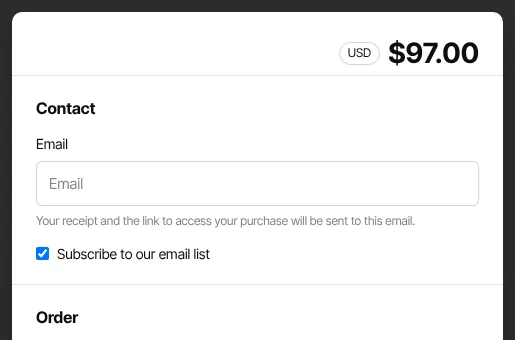
Each click of the pay button is its own attempt. A buyer who clicked it more than once and never paid gets one reminder for each attempt. Free offers have no payment step, so they never send a reminder.
Change the wording
- Go to Settings → Email templates (
/settings/email-templates). - In the Abandoned checkout panel, enter a Subject (blank keeps the default) and an Intro message, which is added to the top of the email.
- Click Save email templates. Saved appears.
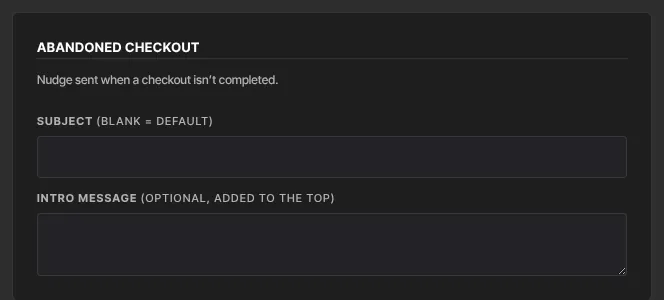
A friendly intro works best, such as an invitation to reply with questions.
What it doesn't do
- There's no second reminder and no setting for the delay.
- For a longer follow-up on a big offer, collect emails with a form and send an email sequence.
What happens next
- If the buyer clicks Complete your purchase and pays, it's an ordinary purchase.
- Reminders carry your school's name.
Common errors
- "Only owners and admins can edit email templates.": ask an owner or admin.
- A buyer got a reminder after paying: they probably paid with a different email, or used a payment method that takes days to clear and hadn't cleared an hour later.
- A buyer got several reminders: they clicked the pay button several times without finishing.