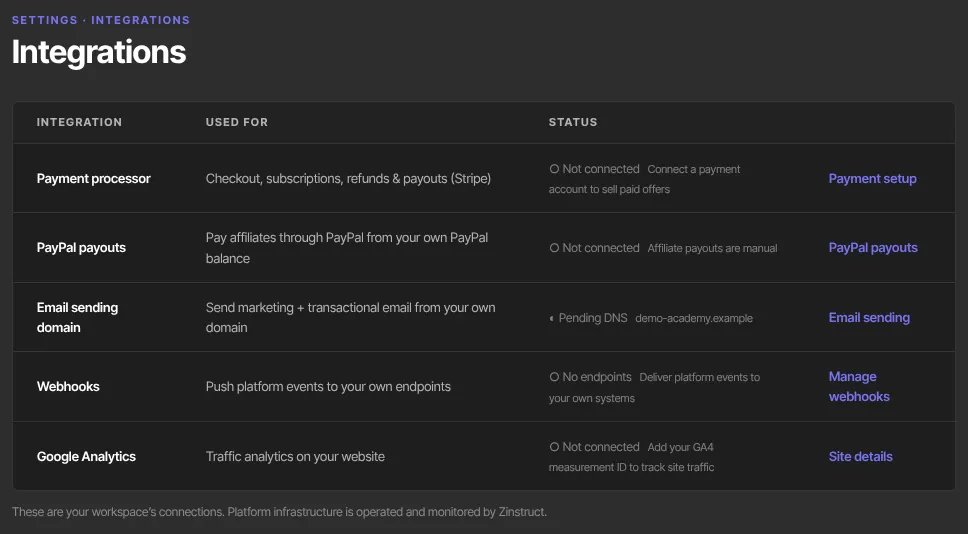
There are three ways to get information from Zinstruct into your other tools, and one page that shows what's connected. Webhooks tell your systems the moment something happens, an API key lets a tool ask for data whenever it likes, and exports give you a spreadsheet. The Integrations page shows the status of your payment processor, email sending domain, webhooks and Google Analytics.
Who can do this
- Integrations page: owners and admins. Staff and viewers see "Only owners and admins can view integrations."
- Webhooks: owners and admins; adding an endpoint needs the Professional plan.
- API keys: the workspace owner only, on any paid plan (Core, Advanced or Professional).
- Exports: see Reports and exports.
Check what's connected
- Click Integrations in the left sidebar under Workspace, or open Settings → Integrations (
/settings/integrations). - Read the five rows. Each shows what it's used for, its status, and a link to the page where you manage it:
- Payment processor: ● Connected, ◐ Onboarding incomplete or ○ Not connected. Link: Payment setup. - PayPal payouts: ● Connected with Live or Sandbox and a shortened Client ID, ◐ Needs attention (PayPal refused the app), or ○ Not connected (affiliate payouts are manual). Link: PayPal payouts. See Pay your affiliates. - Email sending domain: ● Verified, ◐ Pending DNS or ○ Platform domain (email goes out from our shared domain). Link: Email sending. - Webhooks: how many endpoints you have, and how many are active, or ○ No endpoints. Link: Manage webhooks. - Google Analytics: ● Connected with your measurement ID, or ○ Not connected. Link: Site details.
- Click a row's link to connect or change it there. The Integrations page itself only shows status.
Choose how to get data out
- Webhooks push. We send an event to your system the moment it happens: a sale, a signup, a lesson completed. Pick this when something on your side must react straight away, such as bookkeeping or a team alert. Set them up at Settings → Webhooks; see Set up webhooks.
- API keys pull. A tool comes and reads your data whenever it likes: contacts, products, offers, enrollments and engagement reports. Pick this for a dashboard, a spreadsheet or an automation service. Keys can only read. Create one at Settings → API keys; see API keys.
- Exports download. Row-by-row CSV files you open in a spreadsheet, for a one-off pull. See Reports and exports. An offer's purchases also download from Export in that offer's More actions menu.
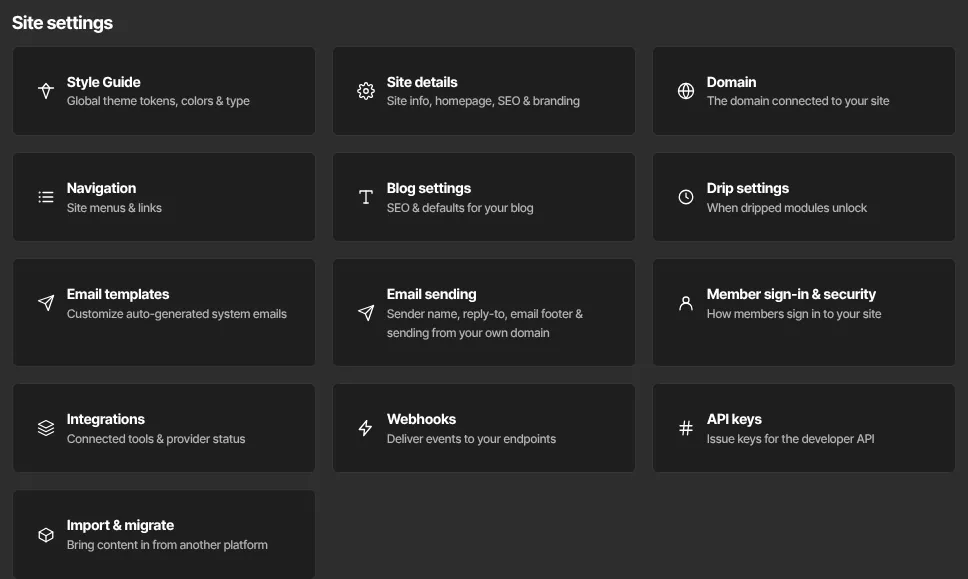
All three are on the Settings page too: the Integrations, Webhooks and API keys cards.
What happens next
- Webhook deliveries start as soon as an endpoint is added. See Receive webhooks.
- An API key works as soon as it's created. A developer starts with Call the API.
- If your plan changes, API keys stop working at once. Existing webhook endpoints keep receiving events, unless Webhooks shows the hosted portal: then nothing is sent until you're back on the Professional plan.
Common errors
- "Only owners and admins can view integrations.": you're signed in as staff or a viewer.
- "Webhooks is included from the Professional plan up. Subscribe in Settings → Billing to unlock it.": you tried to add an endpoint on a lower plan.
- Upgrade to unlock the API instead of the key form: your plan doesn't include the API. See Plans and billing.
- The Webhooks row says ○ No endpoints, but you added endpoints in the hosted webhook portal: this row doesn't count endpoints added in the portal.