zinstruct.com, Zinstruct's own website, asks how you want cookies used before it runs analytics. You choose once per browser, and you can change your mind any time from the footer. This is about Zinstruct's website only; tracking on your school's site is set in Tracking and privacy.
Who can do this
Anyone visiting zinstruct.com, whether or not they have a Zinstruct account.
Make your choice
- Open any page on zinstruct.com. On your first visit, a banner slides up from the bottom of the page.
- Click Strictly necessary only to allow only the cookies the site needs to work, or Accept all to also allow the cookies that help us understand how the site is used.
- The banner closes. The Cookie Notice link in it explains each cookie in detail.

Why the banner behaves differently depending on where you are
- In the European Economic Area, the UK or Switzerland, or if we can't tell where you are: the banner stays until you click one of the buttons. Nothing beyond the strictly necessary cookies runs until you choose.
- Everywhere else: if you don't click within five seconds, Accept all is recorded and the banner slides away. The timer pauses while your pointer is over the banner or it has keyboard focus.
- If your browser sends Global Privacy Control: the banner doesn't appear at all. Your choice is recorded as Strictly necessary only.
Change your choice later
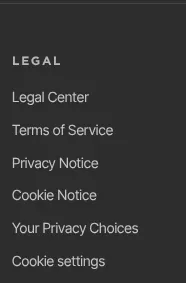
- Scroll to the footer of any zinstruct.com page.
- Under Legal, click Cookie settings. The banner opens again, this time without a timer.
- Click the option you want.
What happens next
- Your choice is saved in this browser for one year. A different browser or device asks again.
- With Accept all, analytics start on the page you're on. With Strictly necessary only, they don't run at all.
- If you came from a link in one of our emails, the code it adds to the address (
lc_id) is removed from the address bar as soon as the page opens, whatever you choose. It's used to recognise you only if you click Accept all.
Common errors
- The banner appears on every visit: your browser is blocking or clearing cookies for zinstruct.com, so your choice can't be saved. Allow cookies for zinstruct.com, then choose again.
- The banner never appeared: your browser sends Global Privacy Control, so Strictly necessary only was recorded for you. Use Cookie settings in the footer if you want to change it.