Your workspace can stop accepting changes, or go offline completely, when your free trial ends without a plan, when a payment for your plan fails, or when the Zinstruct team pauses it. Nothing is deleted. This article explains each case, what you and your visitors see, and how the owner brings everything back.
Who can do this
- Only the workspace owner can subscribe, update the payment method, or export data from the offline page.
- Admins, staff and viewers on an offline workspace see "Only the workspace owner can choose a plan or export its data. Ask them to sign in — everything comes straight back once they do."
- When the Zinstruct team paused the workspace, nobody can bring it back from the app.
- Anyone who also belongs to another Zinstruct workspace can open it from the offline page: a "Switch to another workspace" list shows for admins, staff and viewers, and for everyone when the Zinstruct team paused the workspace.
When your free trial ends without a plan
- The day after your trial ends, the workspace becomes read-only. The owner gets "Your free trial has ended — … can't add anything new", and the banner reads "Your free trial has ended, so you can't add anything new. Your site goes offline in … days unless you subscribe."
- Your site and your members' access keep working for two weeks after the trial ended. In the last three days we email "Your site goes offline in … days", then "… tomorrow".
- After the two weeks, the site goes offline and the workspace is suspended. The owner gets "… is offline" with a Reactivate my workspace button.
Subscribing at any point stops this. See Plans and billing.
What read-only means
- You can still sign in and look at everything.
- Saving changes and creating anything are refused with "Your free trial has ended, so your workspace is read-only. Subscribe in Settings → Billing to start creating again — nothing has been deleted.", next to the button or as a pop-up. Some screens show their usual "Only owners and admins can …" message instead; it means the same.
- Uploading images, files or videos fails too. If your workspace has the in-app help assistant, it can't take new messages either.
- Someone you invited as an Admin can't join yet. When they press Join the team they see "This workspace is read-only right now, so new admins can’t join yet. Ask whoever invited you, then press Join again — this link still works."
- Still working: Subscribe and Manage subscription on Billing, export and close on Settings → Privacy, and signing out.
When your plan ends
If you cancel and the period you paid for runs out, and the Zinstruct team hasn't given you a plan, the workspace becomes read-only in the same way: your site and your members' access keep working and nothing is deleted, but saving and creating are refused. The refusal message mentions the free trial. Subscribing on Settings → Billing restores everything at once.
When a plan payment fails
- The owner gets "Action required: payment failed for …" with an Update payment method button. The payment is retried over the next few days, and meanwhile everything keeps working. Status on Billing reads "past due".
- Still unpaid a few days later: "Reminder: update your payment method".
- Still unpaid at the end of your plan's grace period: "Final notice: … will be suspended", and the workspace goes offline.
Each retry can send its own emails, so you may get the same notice more than once. To fix it before then:
- Open Settings → Billing and check Payment method.
- Click Manage subscription, update your card in the billing portal, and come back.

When a payment goes through, you get "Payment received — … is current again" and the notices stop.
Bring an offline workspace back
When the workspace is offline, signing in takes everyone to a page titled "… is offline" (/reactivate) instead of the Dashboard. What the owner can do there depends on why.
Your trial ended
The page says "Your free trial ended, so your site isn’t being served and your members can’t sign in. Nothing has been deleted yet — choose a plan and everything comes straight back."
- Choose Monthly or Yearly on a plan card and click Subscribe monthly or Subscribe yearly. The first payment is charged today.
- Pay on the Stripe page.
- Back in Zinstruct, you may see "Payment received — bringing … back" for a few seconds. That page refreshes itself and moves you on to your Dashboard when it's ready.
A plan payment failed
The page says "A payment for your plan didn’t go through, so your site isn’t being served. Update your payment method and everything comes straight back."
- Click Update payment method.
- Update your card in the billing portal and come back.
- Once the payment goes through, the page shows "Payment received — bringing … back", then your Dashboard.
Updating the card doesn't always take the payment at once. If the workspace is still offline a day later, contact Zinstruct support from the email you sign in with.
The Zinstruct team paused it
The page says "Our team has paused this workspace. Reply to the email we sent you, or contact support, to sort it out." Paying doesn't lift this kind of pause.
To download your data from the offline page, see Export your data, or close your workspace.
If deletion is scheduled
The offline page also says how long an offline trial workspace is kept. If yours has been scheduled for permanent deletion, the date shows at the top: "This workspace is scheduled to be permanently deleted on …", and the owner is emailed beforehand, with a final notice closer to the date. Choosing a plan before then keeps everything.
What your visitors and members see
While the workspace is suspended, every page of your site shows "This site is temporarily unavailable" and "The owner has been notified. If you reached this page in error, please try again later." That covers your free address, your own domain, checkout and member sign-in. It never says why.
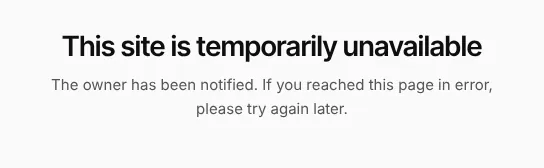
While the workspace is only read-only, your site works as normal.
What happens next
- Once you subscribe or the payment goes through, the site is served again and members can sign in, usually within seconds. Everything you built is still there.
Common errors
- "Your free trial has ended, so your workspace is read-only. …": subscribe on Billing to make changes again.
- Uploads still fail after you subscribed late: if you subscribed after your trial ended, or brought an offline trial workspace back, a few actions such as uploads and the in-app help assistant can still be refused as read-only. Your plan is active and saving works. Contact Zinstruct support from the email you sign in with.
- "Payment received — bringing … back" for more than a few minutes: contact Zinstruct support. Don't pay again.
- Update payment method brings you straight back to the same page: the billing portal couldn't open. Try again in a few minutes, then contact support if it keeps happening.
- "Only the workspace owner can choose a plan or export its data. …": ask the owner to sign in.