This is the full list of what can start an automation and what an automation can do, as the builder at Marketing → Automations shows them. Use it to choose a trigger, or to work out why an action didn't do what you expected. How to build and publish an automation is in Build an automation.
Who can do this
Owners, admins and staff build automations on the Core plan or higher. Viewers can open them but not change them.
Pick a trigger and its target
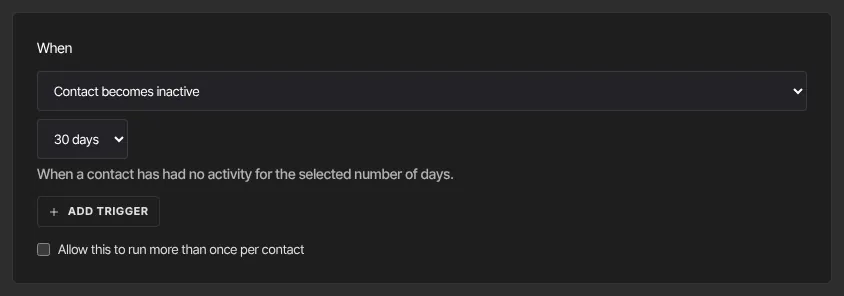
- In the builder, open the menu under When and pick a trigger from the lists below.
- If a second menu appears, choose one item, or leave it on Any … (Any offer, Any product, Any tag, Any form, Any sequence, Any event, or Any survey for quiz funnels) to react to every item of that kind.
- For Contact becomes inactive, choose 7 days, 30 days, 60 days or 90 days.
- Read the hint under the menu: it says exactly when the trigger fires.
Triggers
Sales and subscriptions
- Offer is purchased: pick an offer.
- Payment is refunded (a full or a partial refund), Subscription payment failed (automatic retries carry on), Subscription canceled: pick a product.
- Subscription cancellation requested: someone schedules a cancellation at the end of the period. It fires straight away, before the subscription ends.
- Member accepted a save offer: a member takes a cancel-flow offer.
Learning
- Granted access to a course, Lesson completed, Course completed, Quiz passed, Quiz failed (lesson quizzes inside a course): pick a product.
- Certificate is issued: any certificate, no target. A certificate sent by the Send a certificate action doesn't start it.
Contacts
- Contact is created, Tag is added, Tag is removed, Form is submitted, Contact becomes inactive.
- Subscribed to an email sequence, Email sequence completed, Unsubscribed from a sequence: pick a sequence.
- Unsubscribed from a sequence fires when a contact's run of that sequence is stopped while it's still going: by an automation's Unsubscribe from an email sequence action, or when the contact unsubscribes from your marketing email with the link at the bottom of one of your emails. Unsubscribing that way stops every sequence they're in, so it fires once for each of them.
Events, community and quiz funnels
- Registered for an event, Deregistered from an event.
- Joined a community, Community post published: pick a product with a community.
- Quiz funnel completed: someone finishes the quiz and gave their email.
- Quiz funnel abandoned after capture: fires once per response, the first time someone moves on from a step at or after the quiz's capture point with their email given, whichever step they gave it on. It fires at that moment and doesn't wait to see whether they finish, so someone who goes on to complete the quiz can start it too.
Contact becomes inactive is checked once a day. It finds contacts whose last activity was exactly 7, 30, 60 or 90 days ago. Activity means being added as a contact, submitting a form, a purchase, completing a lesson or course, or passing or failing a lesson quiz. Quiz funnel answers and event registrations don't count. A contact with no activity at all, such as someone imported in bulk who hasn't done anything since, is never picked up.
Actions
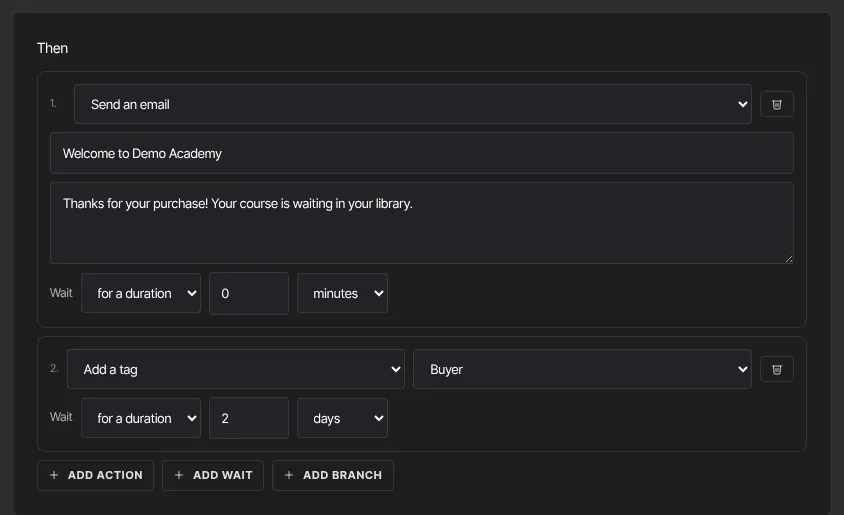
- Add a tag, Remove a tag: pick the tag.
- Grant an offer: gives access to the offer's product. Revoke an offer: removes that access.
- Deactivate an offer (stop future payments): cancels the contact's subscription to that offer at the end of the period; they keep access until then. Nothing happens if they have no active subscription to it.
- Send an email: write a subject and body. It's sent as a marketing email with your footer and an unsubscribe link, and only to contacts subscribed to your marketing email. Pending, unsubscribed and never-subscribed contacts get nothing, yet the run still shows Ran. It's also skipped once your workspace reaches its plan's monthly email limit.
- Subscribe to an email sequence, Unsubscribe from an email sequence: pick the sequence. Sequence emails also go only to subscribed contacts. Unsubscribing stops only that sequence, leaves the contact on your marketing list, and starts any Unsubscribed from a sequence automation for it.
- Update a contact field: Set First name, Last name, Full name, Country, City or Source to a value. Leave the value empty to clear it. Email and marketing status can't be changed this way.
- Send a certificate: pick a product. A certificate is issued only if the contact has access to it, whether they're still working through it or already finished, and the product has a certificate turned on. It doesn't check their progress and doesn't email the certificate; it appears in their library.
- Enroll in another automation: starts a second, published automation for the contact from its first step. The one you're editing isn't in the list. Chains stop after 5 hops.
- Register for an event, Deregister from an event: pick the event. Registering works for published one-time events and recurring series. It does nothing for a draft event, a bookable-time-slots event, or Any event, and Publish doesn't warn you, so always pick the event.
- Post in a community channel: pick the community product, an optional Channel name (blank uses the first channel) and the Post text. It's posted as the host. With no text it does nothing.
Conditions
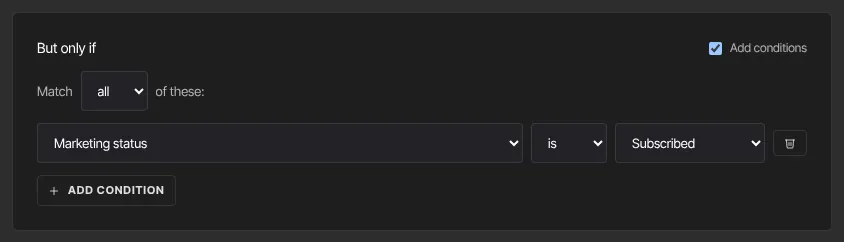
But only if uses the same fields as segments, matched when the trigger fires. Branch paths use the same rules.
What happens next
- Changes to a live automation apply to triggers that happen after you save.
- Every run appears under Recent activity on the automation's page.
Common errors
- "Flow: an action needs you to pick a tag." (or offer, sequence, product, automation): choose the target.
- Send an email ran but nobody got it: the contact isn't subscribed to your marketing email, or your monthly email limit was reached.
- Register for an event ran but there's no registration: the event is a draft, uses bookable time slots, or the action was left on Any event.
- Send a certificate did nothing: the contact has no access to that product (never had it, or it was revoked), its certificate isn't turned on, or they already had a certificate for it.
- Contact becomes inactive never fires: the contact has never had any activity, or their last activity isn't exactly on the threshold day yet.
- Quiz funnel abandoned after capture didn't fire: the person never gave their email, or left on the step where they typed it without moving on, or the quiz has no capture point. It also fires only once per response.
- Unsubscribed from a sequence didn't fire: the contact wasn't part-way through that sequence when they were unsubscribed (they had finished it, or it was paused), or the automation is pinned to a different sequence.
- Quiz respondents don't get your automation email: the quiz's Subscribe respondents to marketing emails setting is off, so respondents are saved as contacts but not subscribed. Turn it on (only if your quiz asks for that consent), or use the quiz ending's result email; see Quiz results, responses and leads.