An A/B test splits your visitors between two or more versions of a page and counts how many of each group click. You send traffic to the test's entry address, and each visitor lands on one version. When one clearly does better, you mark it the winner and point your links at it.
Who can do this
- Staff, admins and owners can create tests and add or remove versions. That includes a running test, where a change affects live visitors straight away.
- Only owners and admins can start, stop, mark a winner or delete a test. Staff see "You don’t have permission to do that."
- Viewers can look only. Create test shows "You don’t have permission for this."
Before you start
Build each version as its own page, website or landing, and publish them. A version whose page is a draft isn't shown to anyone.
Create a test
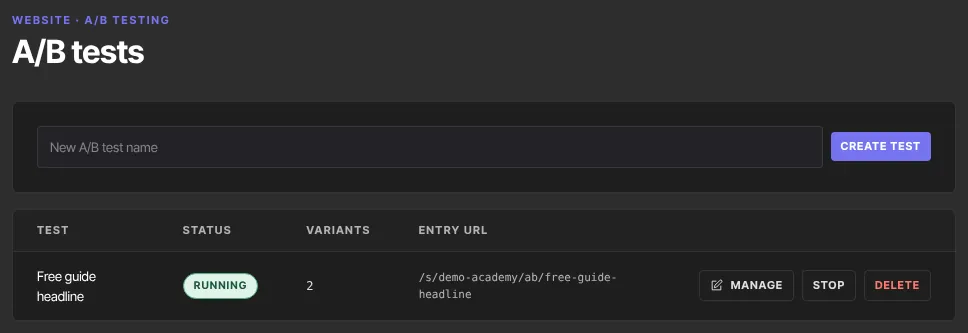
- Go to Website and click A/B tests (
/website/ab). - Type a name in New A/B test name and click Create test.
- The test appears in the list with the status draft, 0 variants and its Entry URL.
Add the versions
- Click Manage on the test.
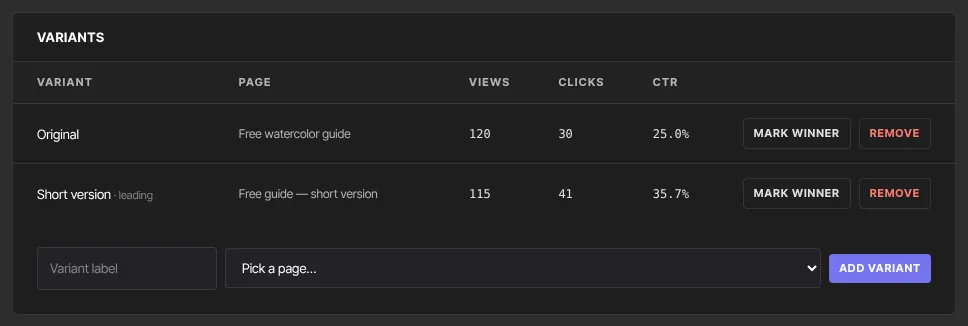
- Type a Variant label, such as "Original", choose its page in Pick a page… (drafts are marked "(draft)"), and click Add variant.
- Repeat for each version. You need at least two to compare.
- Remove takes a version out of the test.
A version whose page is a draft is marked "draft — not shown". One whose page was deleted is marked "no page — not shown".
Start the test and send traffic
- Click Start test at the top. If no version's page is published, the button is greyed out and says "Publish at least one variant’s page to start."
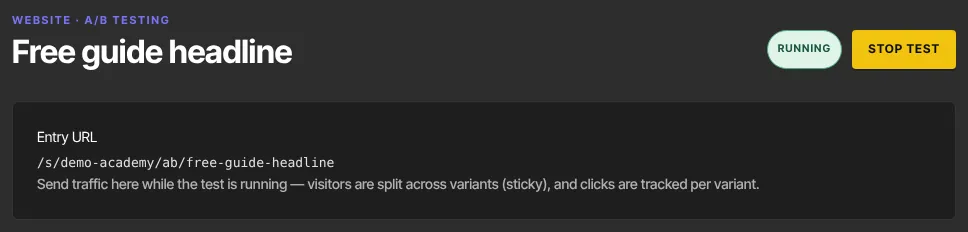
- Share the entry address. The screen shows it as
/s/yourname/ab/your-test-name. On your live site it'syourname.zinstruct.com/ab/your-test-name, or the same path on your own domain. Use it in ads, emails and social posts instead of linking to either page.
How visitors are split and counted
- Each new visitor goes to one version at random. Every version has the same chance; there's no way to give one more traffic.
- The choice sticks: the same visitor sees the same version when they come back, for about 60 days on that browser.
- Views count once per visitor, when they're first sent to a version. Clicks count the visitor's first click anywhere on that page, once per visitor. CTR is clicks divided by views.
- "· leading" marks the version with the best click rate so far, even after a single view. It's arithmetic, not a verdict.
Read the result
- Give the test real traffic before you judge. A handful of views tells you nothing.
- Run it for at least a full week if your traffic changes from day to day.
- If two versions stay within a point or two of each other after plenty of views, treat them as a tie.
Stop the test, pick a winner, or delete it
- Stop test (or Stop in the list) ends the split. The entry address then sends visitors to your site's home page.
- Mark winner on a version adds a winner badge and stops the test. It doesn't send traffic to the winner, so point your links at the winning page yourself.
- Delete in the list removes the test and its counts at once, without asking.
What happens next
- While a test is a draft or stopped, or after it's deleted, its entry address sends visitors to your home page.
- Unpublishing a version's page takes it out of the split.
Common errors
- "Name the test.": type a name first.
- "A test with that URL already exists.": the name becomes part of the address. Choose a different name.
- "Could not create the test.": try again.
- Start in the list does nothing: no version's page is published. Click Manage to see which pages are drafts.
- "You don’t have permission to do that.": only owners and admins can start, stop, pick a winner or delete.
- "You don’t have permission for this.": viewers can't create tests.
- Visitors land on your home page: the test isn't running, or none of its pages are published.